CFv4 Elements and HTML

How can I build a 'combo' box input?

A 'combo' box is a linked pair of a select drop-down and a text input set up so that the text box is only enabled (and required) if the 'Other' option is selected in the drop down; otherwise it is empty and disabled.

How can I add custom HTML?

If you have an existing form then it can be really useful to be able to copy and paste the HTML directly into ChronoForms. There are two ways to do this.


How can I have a button to add more form inputs?

It's quite common on a form to have one part that repeats several times. If the number of repeats varies then it can be useful to have an 'Add one' button that will add an extra copy of this part of the form. An example might be for a booking form where one booking can be for several people and you want to enter all of their names. This FAQ shows you how to do this when the number of repeats is limited e.g. up to x people.

How do I build a select drop-down, radio button or checkbox group?

These three form elements: select drop-downs, checkbox groups and radio button groups all accept lists of options i.e. value+label pairs. This FAQ shows you several ways in which ChronoForms can create option lists. Most of the FAQ will look at select drop-downs but the same methods can be used with checkbox groups or radio button groups.

How can I automatically copy fields from one part of my form to another?

The most common example of this request is when you need to have both a billing address and a shipping address and you want to copy the address over to save the user filling out the same or similar details twice. This FAQ looks at some ways to do this with JavaScript.

How can I show a form on my site?

ChronoForms makes it easy to create forms but it's not always obvious how to use them. This FAQ talks about four ways you can display them. 

How can I prevent tabbing to tooltips?

In some browsers (but not all) if you have tool tips on your inputs then tabbing between inputs will also tab to the tooltip links. Here's a JavaScript snippet to prevent this: 

How can I build a big form?

Simple forms with a few inputs are very easy in ChronoForms. But many forms have tens, sometimes hundreds of inputs and then it can become difficult to build in the Form Wizard Preview box. Here are some suggestions for making it easier to build large forms.

What are the differences between select drop-downs, radio buttons and checkboxes?

There are several different kinds of form input that you can use in HTML. Text inputs and text areas are the most commonly used. After that come select drop-downs, radio buttons and checkboxes? Each of these allows the user to select one or more options from a preset range. This FAQ looks at the differences between them.

I need custom code for my form

If you want custom code written then you can ask Max or GreyHead - we both do paid custom client work. You can also find help from many coding freelance sites on the web.

What's the Container element for?

What the new (in CFv4 RC3.4) Container element appears to do is to provide a way of 'grouping' form elements into blocks.

What is an autoID?

If you don't add id attributes to your form elements then ChronoForms will create them for you. 

What are form Elements?

A ChronoForms Element is used to build the Form HTML that is displayed to the user when the form is viewed in a web browser. 

How can I put several form inputs in the same row?

By default ChronoForms lays out your form inputs in a single column with each input under the previous one.

If you want to put several inputs into a single row you can use the Multi field row options on the Other tab of most of the form elements.

My multi-select dropdown doesn't republish

To make a multi-select drop-down work so it reselects items when editing a record you need to do the following:

I can't add more inputs to my form

If you have problem adding more inputs or actions to your form or you can't create a table and just get returned to the Joomla! Admin page when you try this is most likely because of security settings on your server.These settings limit the number of variables that can be submitted from an Admin page. Because ChronoForms is complex and uses many inputs it can exceed the default limits.

Is there a limit on the number of inputs?

There is no built in limit on the number of inputs or actions that you can have in a ChronoForm.

If you are finding that you can't add any more then you are probably hitting a limit that is set on your server.

My form tabs don't work or look as expected

ChronoForms can help you add tabs to your form, but it will not load the tabs CSS code, and if your template doesn't provide the tabs CSS then your tabs may not work as expected. Here's how to get them to work:

How do I prevent a list of previous results showing?

AutoComplete example
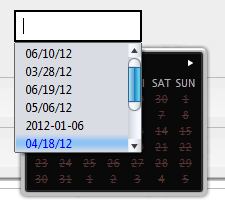
Sometimes when you click into a form input box you will see a drop-down list of previous results appear. Sometimes this is helpful, in other cases, with date-pickers in particular it can get in the way.

How can I get information about the current page?

If you are using your ChronoForm in a plug-in or module it can be useful to add information about the current page to the form results. Here are ways to add the page URL or title.
