Published:
If you need to run a particular action depending on the form results then there are four ways of doing this.
Long forms are sometimes necessary but can look difficult to the user as well as being difficult to work through and navigate. It often helps to break them up into separate pages or tabs. In this FAQ we'll look at building a simple multi-page form.
"There should be an additional check box in the form where the sender can request an e-mail notification." A user asked how to do this today, the solution is easy, as long as you know how to do it, here is how.
ChronoForms comes with a large set of form actions mostly written by Max, the ChronoForms owner and developer. Sometimes I write new actions, or variations on the standard actions and I add [GH] (or [P] in one case) to the name to distinguish them from the standard actions.
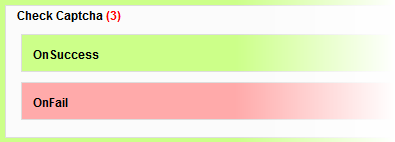 Some of the ChronoForms actions - like the Check Captcha for example - have extra boxes in them when you drag them into an event. Usually, but not always, these are labelled as they are here 'On Success' and 'On Fail'.
The Payment Gateway actions included in the ChronoForms package are 'Trial' versions. They are fully functional and can be used for development except that they randomly change the amount.
We accept 
