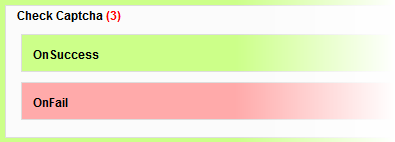
 Some of the ChronoForms actions - like the Check Captcha for example - have extra boxes in them when you drag them into an event. Usually, but not always, these are labelled as they are here 'On Success' and 'On Fail'.
Each of these is a new 'event' like the familiar 'On Load' and 'On Submit' events that are created automatically. And, like those events, you can drag actions into them.
These events are not run automatically; they will only be run if their parent action triggers them. For the Check Captcha action the On Success event is triggered when the Captcha is correctly matched; and the On Fail event if it is not matched.
Most of the time you can safely ignore the On Success event. If you leave it empty then the next action after the Check Captcha action will be run and this will be exactly what you need.
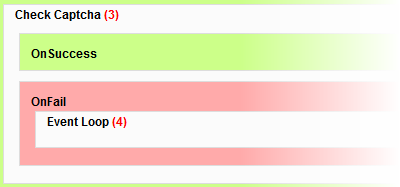 You do need to handle the On Fail case though - if you leave this empty then nothng will happen on failure and the next action will be run. Usually what you want to do is to re-display the form with an Error Message; to do this you need to drag an Event Loop action into the pink On Fail event box. The default settings will normally be OK.
See this FAQ for more information on the Event Loop action.
You can use other actions in the OnFail (or On Success) events if you need them. You could for instance use a DB Save action to record and track failed form submissions if this information is useful to you.


Comments