Problem with large form imported from ChronoForms v7 to v8

Importing multi-page forms from ChronoForms v7 to v8.

Overview

The import process may not correctly assign page groups for all pages, and server settings can limit form functionality.
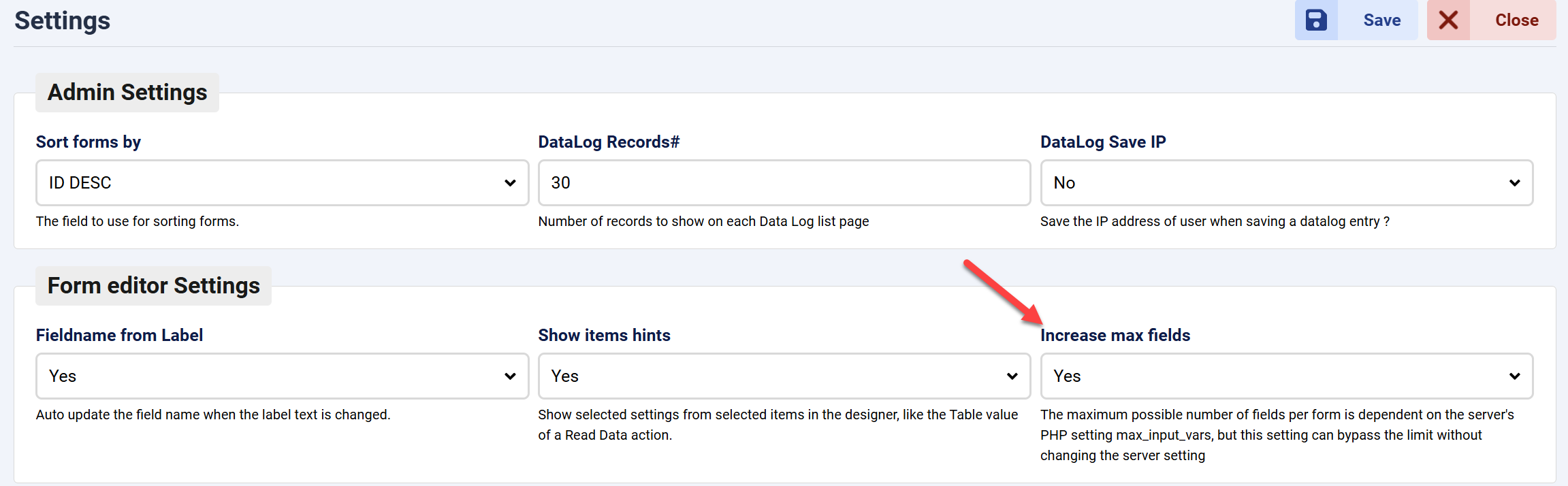
After importing, manually set the page groups for each page. If pages are missing or uneditable, increase the Max Input Vars limit in the CF8 settings.

Answered
ChronoForms v8
Fr Fredolino 18d ago

Hi

Importing forms with multiple page groups isn't working for me. Only the pages from the first page group were imported from version 7 to version 8. All other page groups with their pages are missing.

Furthermore, I can't change page names (titles?) after the fourth page.

This worked perfectly in version 7. What's the problem with version 8?

F.

Screenshot_CF8.png
Screenshot_CF7.png

Hi,

Is this a bug and will it be fixed in the next update?

F.

Max_admin Max_admin 2d ago
Answer
1 Likes

Hi Fredolino

I have just tested this, all pages were imported but you need to set the Page Group for pages after import.

If some pages are missing or you can not change page settings then it may be the Max Input Vars setting on your web server, you can override it in the ChronoForms8 settings page as shown:
Problem with large form imported from ChronoForms v7 to v8 image 1

Let me know your test results.

Max, ChronoForms developer
ChronoMyAdmin: Database administration within Joomla, no phpMyAdmin needed.
ChronoMails simplifies Joomla email: newsletters, logging, and custom templates.
Fr Fredolino 1d ago
1 Likes

I wasn't familiar with this setting before.

Thank you so much! :-)

F.

Max_admin Max_admin 7h ago

No problem, this is a very important setting when you have a large form! :)

Max, ChronoForms developer
ChronoMyAdmin: Database administration within Joomla, no phpMyAdmin needed.
ChronoMails simplifies Joomla email: newsletters, logging, and custom templates.
Post a Reply
