Question About Run Condition

Configure a 'not equal to' run condition in ChronoForms 8.

Overview

The issue occurs because the '!=' operator is not available in the dropdown menu for run conditions in CF 8.
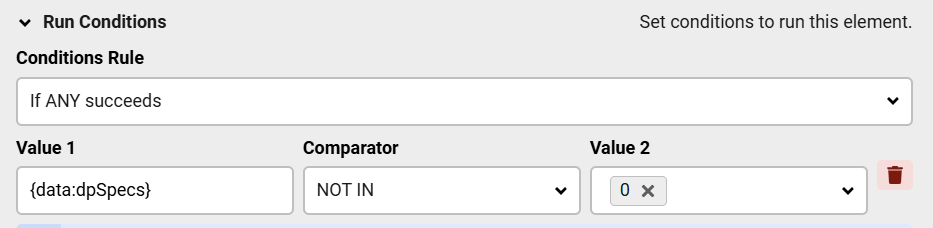
Use the 'NOT IN' condition from the dropdown list as a direct replacement for the '!=' operator.

Answered
ChronoForms v8
Fr Fredolino 05 Mar, 2026

Hi,

In CF 7, I could still configure this setting in the Run Condition:

{data:dpSpecs}    !=    0

In CF 8, there's only a drop-down list. However, the characters

=

!=

and so on are missing.

Is this how it's supposed to stay?

F.

Max_admin Max_admin 07 Mar, 2026
Answer
1 Likes

Hi Fred

Just use the NOT IN condition instead of !=
Question About Run Condition image 1

Max, ChronoForms developer
ChronoMyAdmin: Database administration within Joomla, no phpMyAdmin needed.
ChronoMails simplifies Joomla email: newsletters, logging, and custom templates.
Post a Reply

