Icons for Button Problem?

Display icons in a CF button.

Overview

The issue occurs because the icon names have been updated, and older names like 'times' or 'save' no longer function.
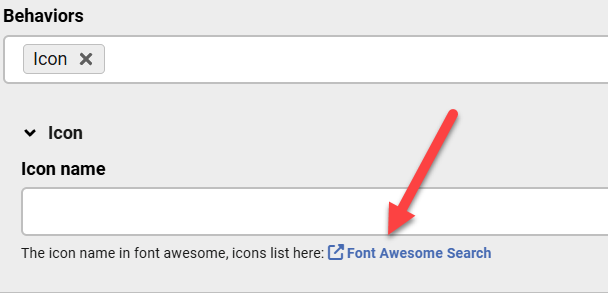
Use the new, correct icon names, such as 'xmark' for 'times' and 'floppy-disk' for 'save'. A future update will include a link to search for the appropriate icon names directly in the field.

Answered
ChronoForms v8
Fr Fredolino 28 Jan, 2026
1 Likes

Hello,

Is it possible that using icons in the button isn't working either?

I select Behaviors Icon and enter a name like "times" or "save" as the icon name, but it's not displayed.

F.

Problem solved. `times` and `save` no longer work. Now you have to enter `xmark` and `floppy-disk`... Before it was simpler: select the icon and you were done. Now you constantly have to search for the correct name because nobody knows which icon version works or what the exact name is. I consider this a step backward, not an improvement.

Max_admin Max_admin 28 Jan, 2026
Answer

Hi Fred

it lets the user choose whatever icon they need, I have added a link to the search page in the Icon field hint:
Icons for Button Problem? image 1

Max, ChronoForms developer
ChronoMyAdmin: Database administration within Joomla, no phpMyAdmin needed.
ChronoMails simplifies Joomla email: newsletters, logging, and custom templates.
Max_admin Max_admin 04 Feb, 2026

Hi Fred

The link will be in the next update, is this what you are asking about ?

Max, ChronoForms developer
ChronoMyAdmin: Database administration within Joomla, no phpMyAdmin needed.
ChronoMails simplifies Joomla email: newsletters, logging, and custom templates.
Fr Fredolino 04 Feb, 2026

Perfect! Thank you so much for your work!

Post a Reply
