Calendar Setting dates limits with Shortcode in CFV8 ( as it was in cfv7)

How to set date limits with shortcode in ChronoForms v8 calendar.

Overview

The problem is that the date limit setting method changed from ChronoForms v7 to v8.
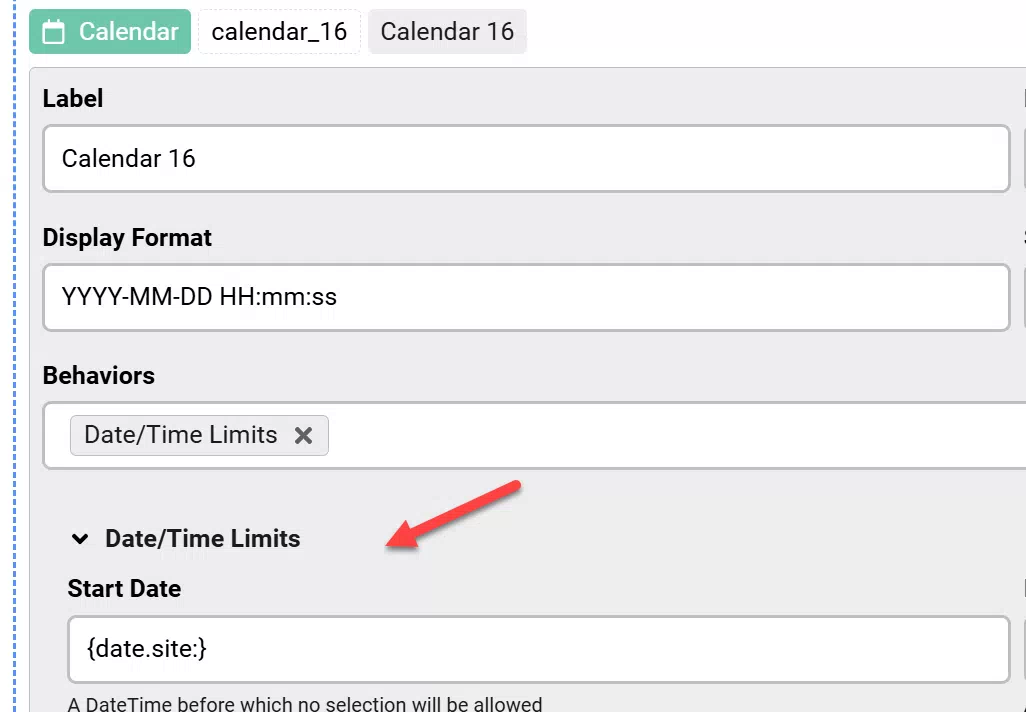
Use the {date.site:} shortcode in the Start Date field under Date/Time Limits behavior in the Calendar field settings.

Answered
ChronoForms v8
si simelas 18d ago

Hi Max, how do you set this earliest date time in CFV8 calendar  as it was in CFV7 ? picture of CFV7Calendar Setting dates limits with Shortcode in CFV8 ( as it was in cfv7) image 1

Cheers

Max_admin Max_admin 13d ago
Answer

Hi simelas

use {date.site:} at Start Date under Date/Time Limits behavior in the Calendar field as shown below:

Calendar Setting dates limits with Shortcode in CFV8 ( as it was in cfv7) image 2

Max, ChronoForms developer
ChronoMyAdmin: Database administration within Joomla, no phpMyAdmin needed.
ChronoMails simplifies Joomla email: newsletters, logging, and custom templates.
Post a Reply