Hi
How to use iframe in Text Area field on Joomla 6 + CF7 (may be CF8) + TinyMCE ? Like this...
File: \plugins\system\chronog3_plg\chronog3\assets\js\g3.tinymce.js
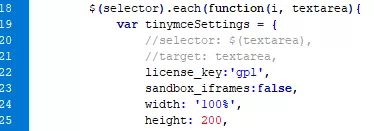
Enjoy...

Hi Colnem
Thanks for posting this one.
But why do you need to disable the iframe ?
Hi Max
"But why do you need to disable the iframe ?"
No. I need to disable sandbox to add an iframe in a textarea (insert an Openrunner map).
Is it possible to add an option in Textarea element with to able/disable sandbox?
Thanks
Hi Colnem
in v8 ?
Hi
Yes. IN CF8 TextArea Element. So we'll use sandbox=true for some forms and sandbox=false for others. I've try with html attribute but it's doesn't work.
I think that you don't implemente CF7 to use with Joomla 6 without Joomla Plugin Compatibility.
So, I begin to transform my CF7 Forms to CF8, but it's not easy, because my forms are very complex. All is différent. Short codes are different. Spirit is différent.
Thanks
Hi Colnem
Please try this, in the Textarea HTML Attributes, you can add this new attribute:
data-settings={"sandbox_iframes":false}The editor is supposed to load extra settings set in the settings data attribute of the textarea
v7 is not being developed anymore because the focus is on v8 which has the modern codebase and interface.
Hi, Max
This doesn't works in CF7 (HTML Tag Attributes behavior).
g3tinymce.js is commun to CF7 and CF8 and I use CF7 for many forms.
So, I have to keep sandbox:false in g3tinymce.js as long as I don't transform all my CF7 forms in cf8 forms.
Please, wait some weeks.
Sorry
Did you test it in v8 ? this is supported in v8 only now ?
Hi
In CF8, it's not necessary to use HTML attributes. <iframe> is saved without sandbox_iframes:false in g3.tinymce.js
But I have two problems:
1 - Save Action: Syntax Error near 'my_table' at line 1... but It's work !!!
In Where Statement, I write id = '6952'Use {data.quote:param-name} to quote values in your where statement ??? I don't understand what it means.
2 - If I enable WYSIWIG editor in Textarea element and insert iframe like this...
<iframe width="100%" height="500" loading="lazy" src="https://www.openrunner.com/embed.html?code=513266383779616b334842566e694d55544d4c777448556647696843384a2f34777463414d3069525946303d3a3a688103388c94a7381466c122336ec849&lng=auto&unit=metric" style="border: none;"></iframe>
... Server answers...
... Internal Server Error
The server encountered an internal error or misconfiguration and was unable to complete your request.
Please contact the server administrator at wampserver@wampserver.invalid to inform them of the time this error occurred, and the actions you performed just before this error.
More information about this error may be available in the server error log.
All working in CF7...
Hi Colnem
1- the quote will be added automatically when you use a shortcode inside the WHERE statement box, but you can also add it manually:
id = {data.quote:param} // this will result in id = '123'2- try to make the iframe URL shorter, maybe the main domain only, if it works then it's the URL format or length causing the issue, if not then it can be a server configuration issue, does it work when you force the sanebox_iframe to false in v8 ?

