How to switch off TinyMCE iframe in ChronoForms 7

How to switch off TinyMCE iframe in ChronoForms 7.

Overview

The problem is that TinyMCE uses an iframe by default in the Text Area field, which may not be desired for certain layouts or integrations.
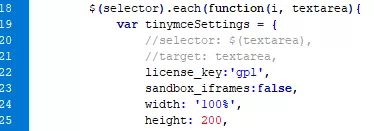
Disable the iframe mode by modifying the TinyMCE configuration in the ChronoForms plugin file, specifically in the g3.tinymce.js file, to use inline editing instead of iframe-based editing.

Co Colnem 15d ago
Answer
1 Likes

Hi

How to use iframe in Text Area field on Joomla 6 + CF7 (may be CF8) + TinyMCE ? Like this...

File:  \plugins\system\chronog3_plg\chronog3\assets\js\g3.tinymce.js

How to switch off TinyMCE iframe in ChronoForms 7 image 1

Enjoy...

Max_admin Max_admin 2d ago

Hi Colnem

Thanks for posting this one.

But why do you need to disable the iframe ?

Max, ChronoForms developer
ChronoMyAdmin: Database administration within Joomla, no phpMyAdmin needed.
ChronoMails simplifies Joomla email: newsletters, logging, and custom templates.
Co Colnem 1d ago

Hi Max

"But why do you need to disable the iframe ?"

No. I need to disable sandbox to add an iframe in a textarea (insert an Openrunner map).

Is it possible to add an option in Textarea element with to able/disable sandbox?

Thanks

Max_admin Max_admin 7h ago

Hi Colnem

in v8 ?

Max, ChronoForms developer
ChronoMyAdmin: Database administration within Joomla, no phpMyAdmin needed.
ChronoMails simplifies Joomla email: newsletters, logging, and custom templates.
Co Colnem 6h ago

Hi

Yes. IN CF8 TextArea Element. So we'll use sandbox=true for some forms and sandbox=false for others. I've try with html attribute but it's doesn't work.

I think that you don't implemente CF7 to use with Joomla 6 without Joomla Plugin Compatibility.

So, I begin to transform my CF7 Forms to CF8, but it's not easy, because my forms are very complex. All is différent. Short codes are different. Spirit is différent.

Thanks

Post a Reply