regex validation fails on submit in 8.0.51 but works in 8.0.21

How to fix regex validation failing on submit in ChronoForms 8.0.51 but working in 8.0.21.

Overview

The problem is that the regex pattern was missing delimiter slashes, which caused server-side validation to fail in the newer version.
Add forward slash delimiters at the start and end of the regex pattern to ensure proper server-side validation on submit.

Answered
ChronoForms v8
bc bcraigie 20d ago

Hello Max,

I have a form that validates UK phone numbers using this regex:

^([0|\+[0-9]{1,5})?([0-9]{10})$

The regex works in the form on Chronoforms 8.0.21 (form submits correctly) but does not work in the form on 8.0.51 (it displays my error message on submit)

In both versions, the front-end is ok with the validation, but on 8.0.51 after clicking submit, the form displays my error message at the top of the form and does not submit the form.

Is this maybe a bug that was introduced between these Chronoforms versions?  It seems the server-side validation does not work correctly on 8.0.51 ?

Thanks

Brian

Max_admin Max_admin 20d ago
Answer

Hi Brian

You need delimiters slashes, this works fine here:
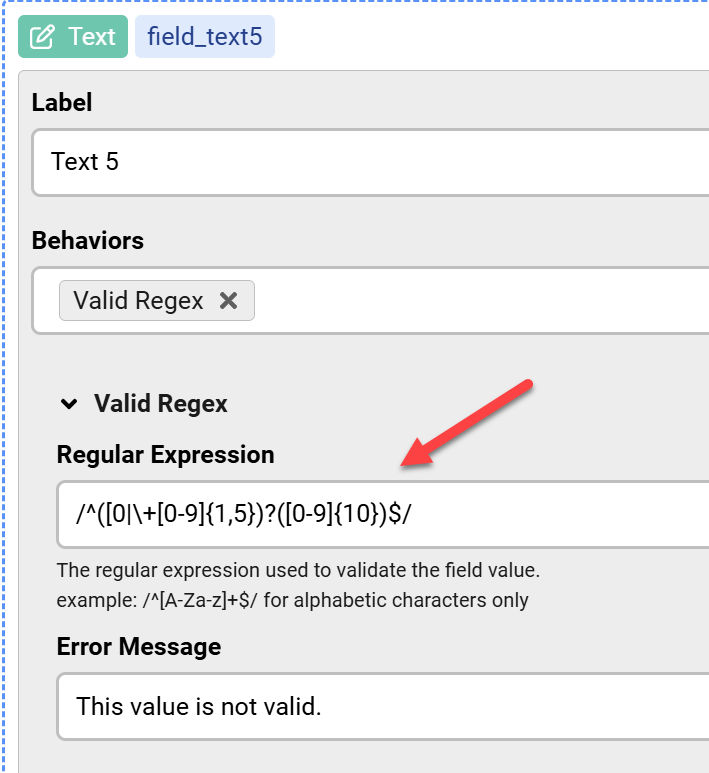
regex validation fails on submit in 8.0.51 but works in 8.0.21 image 1

Please test that and let me know

Max, ChronoForms developer
ChronoMyAdmin: Database administration within Joomla, no phpMyAdmin needed.
ChronoMails simplifies Joomla email: newsletters, logging, and custom templates.
bc bcraigie 19d ago

Hi Max,

Aha!  Silly me.  Yes.  That fixes it. :-)

Thank you.

Max_admin Max_admin 19d ago

No problem! :)

Max, ChronoForms developer
ChronoMyAdmin: Database administration within Joomla, no phpMyAdmin needed.
ChronoMails simplifies Joomla email: newsletters, logging, and custom templates.
Post a Reply

