Hi Max,
The email addresses come from an array and I convert them into a string using a PHP script.
php47.
$bcc_clean = [];
foreach ($this->data['bcc_list'] as $mail) {
$mail = trim($mail);
if (filter_var($mail, FILTER_VALIDATE_EMAIL)) {
$bcc_clean[] = $mail;
}
}
return implode(',', $bcc_clean);
I put {var:php47} in the BCC field. Everything looks perfect. But when I send the email, I get this error:
Invalid address: (bcc): xxxxxxxxxxxn@gmail.com, xxxxxxxxxx
where the @gmail.com from the last mailadres disappeared.
Is this a bug or is it impossible to usee more then one BCC adres
Greetings
Paul
Hi Max
The solution is use is that I fill the BCC direct with an PHP script and not with {var:php23}.
The script looks like:
if (!empty($this->data['bcc_list'])) {
$clean = [];
foreach ($this->data['bcc_list'] as $mail) {
$mail = trim($mail);
if (filter_var($mail, FILTER_VALIDATE_EMAIL)) {
$clean[] = $mail;
}
}
// Zet de BCC direct in de mail action configuratie
$this->set('send_mail.bcc', $clean);
}
Greetings Paul
Hi PKoll
Do you mean that you return an array of addresses from the PHP action ? because that's how it should work
P.S: why the message you write has no formatting ?
Max, ChronoForms developer
ChronoMyAdmin: Database administration within Joomla, no phpMyAdmin needed.
ChronoMails simplifies Joomla email: newsletters, logging, and custom templates.
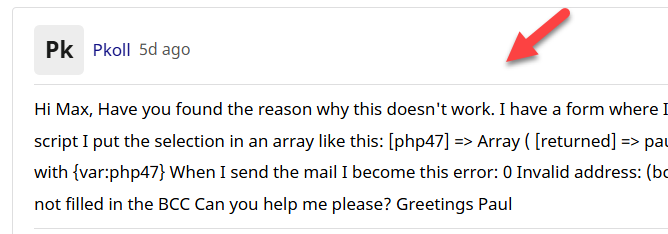
Hi Max,
Have you found the reason why this doesn't work.
I have a form where I read the selection from a table-view with differend mailadresses.
With a php script I put the selection in an array like this:
[php47] => Array
(
[returned] => paulkollau@gmail.com,paulkollau@ziggo.nl
)
In the mailaction the bcc is filled with {var:php47}
When I send the mail I become this error:
0 Invalid address: (bcc): 'paulkollau@gmail.com,paulkollau
As you can see the last @ziggo.nl is not filled in the BCC
Can you help me please?
Greetings
Paul
The formatting? I don't understand. I have tried again the same question with formatting but it don't work. Sorry
Paul
Hi Paul
I checked the code, the bcc can not have an array value, you need to add multiple addresses in a comma separated list, this is because some users may use this format:
address@domain.com,{data:email},{var:php}
So if you have 2 addresses then you will need 2 php actions
However, the next update should support getting an array from a PHP action as you have now.
Regarding the formatting, I'm talking about the forum posts text you have, it does not have new lines:
Max, ChronoForms developer
ChronoMyAdmin: Database administration within Joomla, no phpMyAdmin needed.
ChronoMails simplifies Joomla email: newsletters, logging, and custom templates.
Hi Paul
I think the new update v8.0.52 will be released later this week, a newsletter update will be sent.
Max, ChronoForms developer
ChronoMyAdmin: Database administration within Joomla, no phpMyAdmin needed.
ChronoMails simplifies Joomla email: newsletters, logging, and custom templates.


