I have fields set to hidden with events. I need these fields to show if dojo=1 and age <18. For anything else they should be hidden. I have the event for show setup if all match. It is not working. If I set it up to show for dojo =1 and hide if dojo not = 1, it works. If iset it up to show when age is <18 and hid when age=>18, it works. I can't get it to show when dojo =1 and age <18.

Did you try the Triggers/Listeners in v8 ? they have a more flexible setup than v7 events
I'm trying to figure it out in v8. Right now I have at the top of my form fields for dojo, date of birth, and Age (read only and calculated using javescript). I've created a container that includes fields for town of residence, ethnicity, and grade. Using the FAQ for listeners and triggers I have successfully hidden that container on load, shows the container when the first option is chosen for dojo, and hides the container if any other option is chosen for dojo. Now I need to set it so the container only shows if the first dojo option is chosen and the javascript calculated age is less than 18. It is only if those two conditions are met that the container and its fields are shown. That is what I need help setting up. If it's any other dojo or the age is >= 18 then the container should be hidden.I've been using v7 for years and am very comfortable with it. I've looked at v8 many times and have been hesitant to move to it because of the differences to v7.It would be nice if there were a way to migrate v7 forms to v8 without having to build them new.
This is how your Container should be setup:
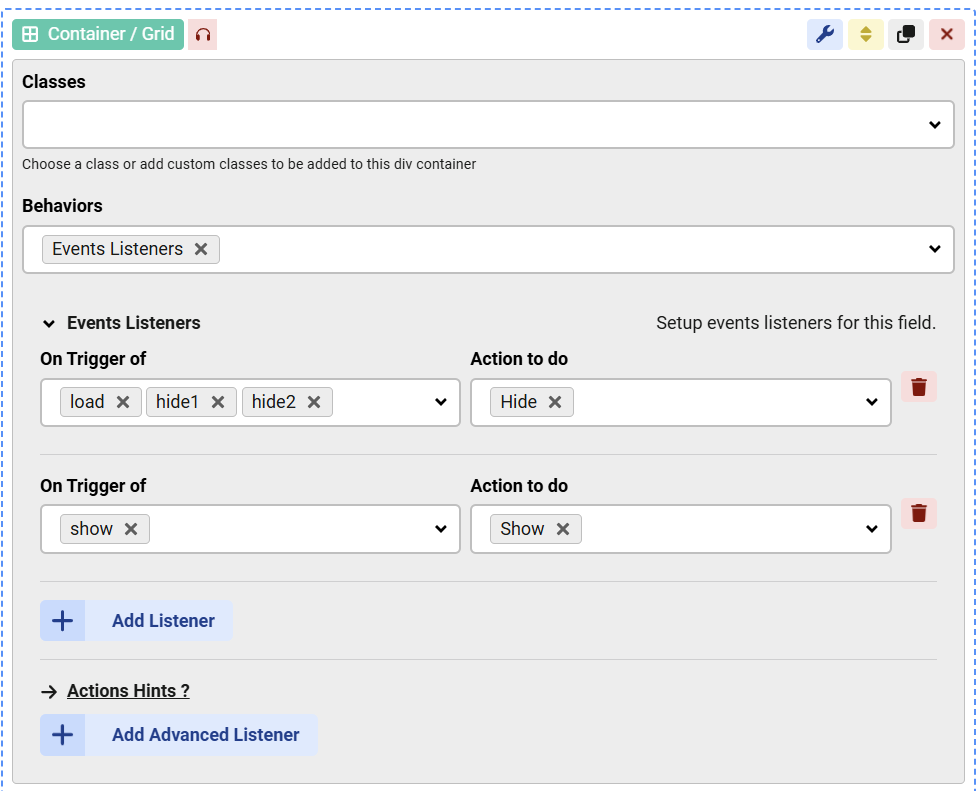
this hides the container when either the "load" or "hide1" or "hide2" triggers are fired, and shows it when the "show" trigger is fired.
Then you need to setup the triggers themselves, you better do this in the Dojo field:
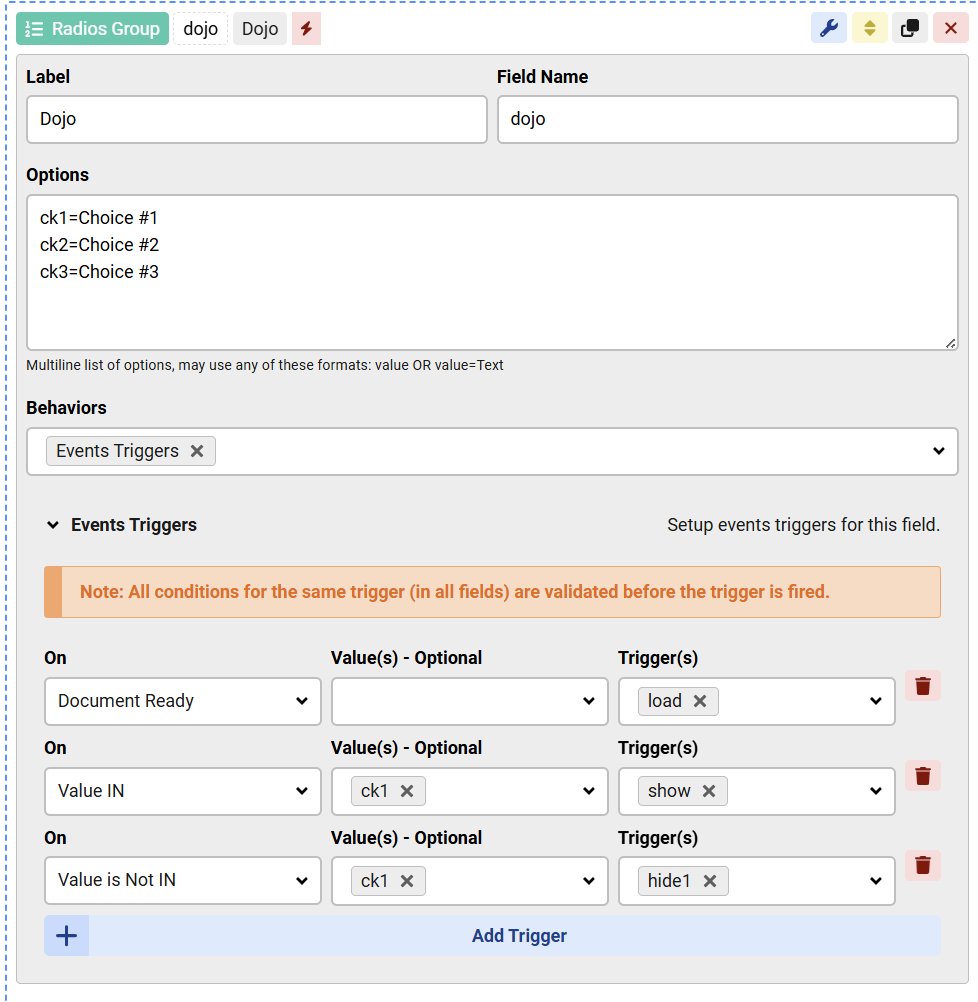
The "load" trigger fires when the page loads, and the "show" or "hide1" are triggered based on the selected value.
That should do what you need but it's still missing the Age check, here is how to do it:
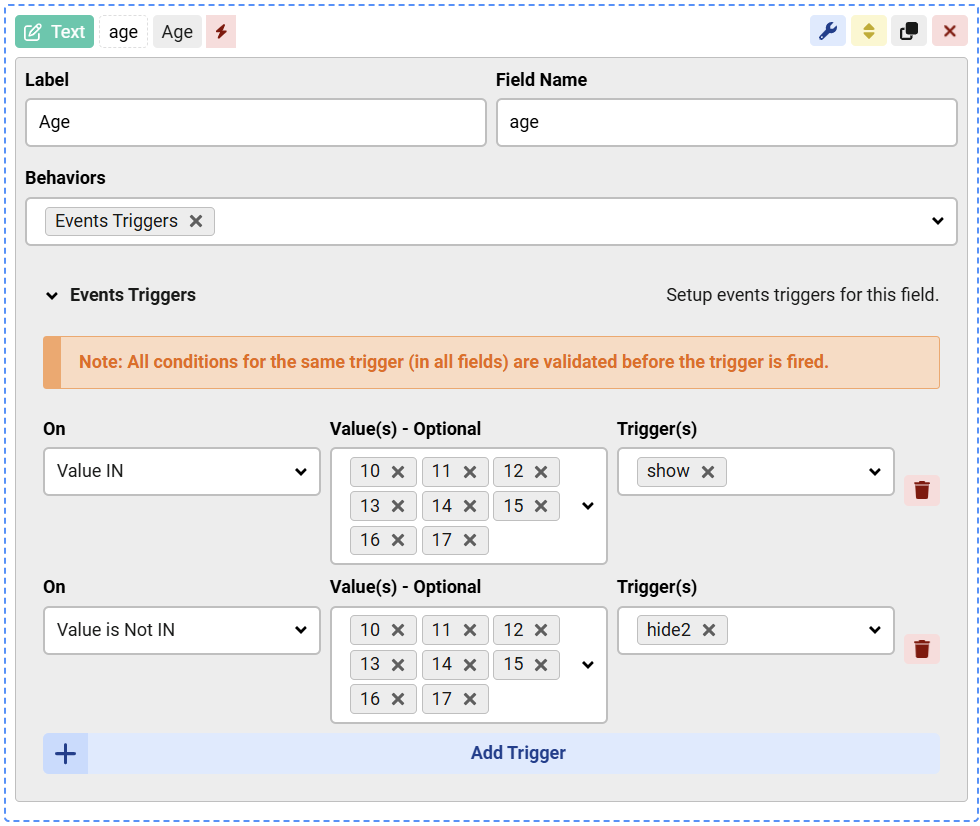
When the value is less than 18, the "show" trigger is fired, this adds the 2nd condition for the "Show" trigger, so that both fields values should match the conditions before that trigger will fire.
Opposite for the "hide2" trigger.
We had to use hide1 and hide2 in order to hide the container if either condition is met
Thanks for the response. I will try it either this evening or tomorrow and let you know.
For the most part this works. I did find a scenario that needs to be addressed. Age is calculated based on Date of Birth. If the age is calculated to be <18 and the dojo selected is 1, then the container is shown, what I want. If the dojo selected is anything but 1 the container is hidden, what I want, If the calculated age is >= 18, regardless of dojo, the container is hidden, what I want. If selected dojo is one the user enters a date of birth that calculates the age as 18 or greater the container is hidden, but they realize the date of birth is wrong and when they enter the correct date of birth and the age recalculates to be less <18 the container shows, as it should. However if dojo is 1 and the initial calculated age is <18 it shows the container, but then they update the date of birth so the age is >=18 the container does not hide, which is what I need.
The events depend on the "change" event of the Age field, so whenever you recalculate the age you need to set the value of the age field AND trigger the change event on that field.
How do you calculate the age ? using JavaScript ?
Do you trigger the change event for that field in the code after the change ?

