Max,
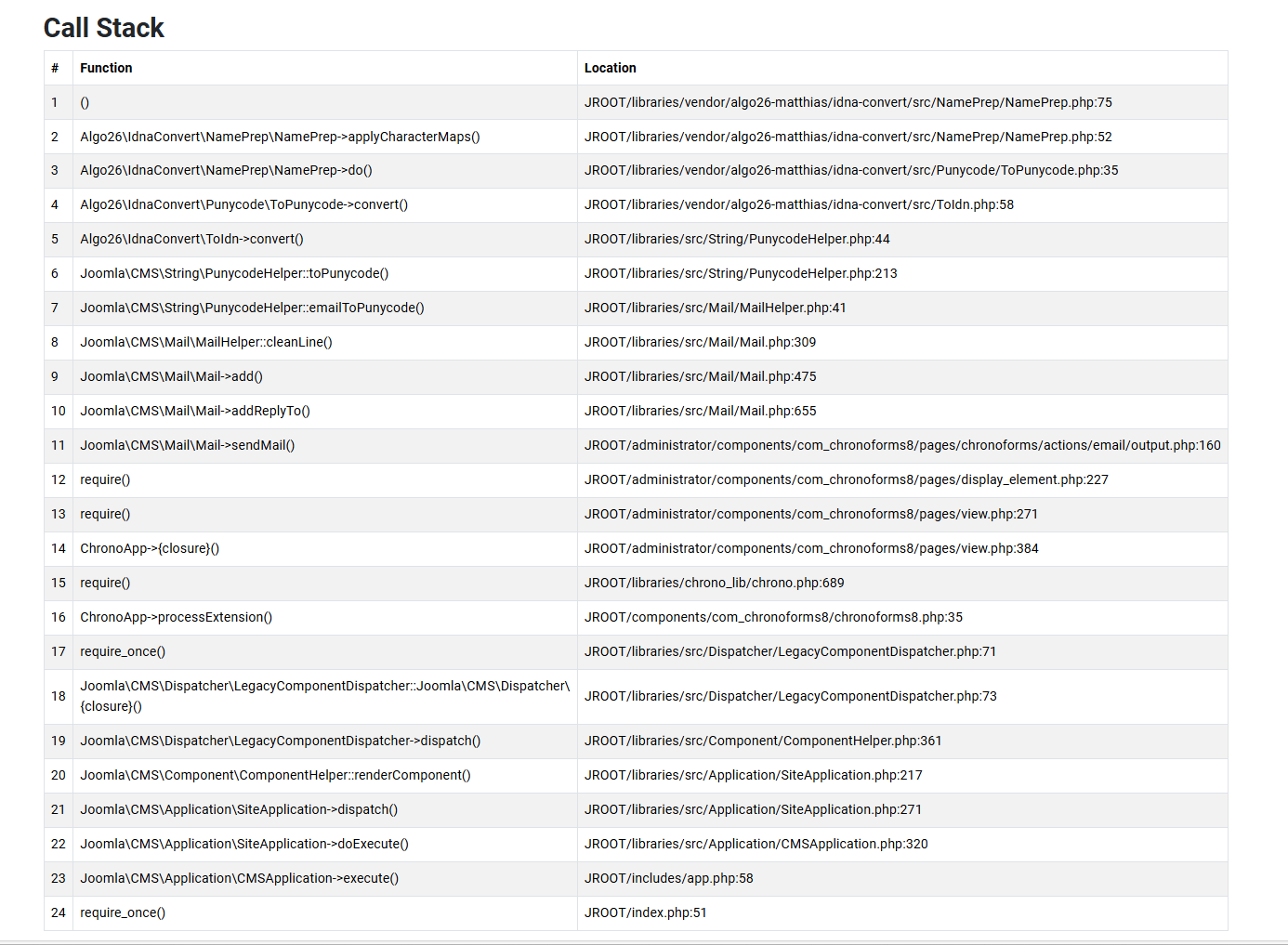
after upgrading from Joomla 5.4.2 to version 6,0.2 I got the following error message. Can you propose any solution?:
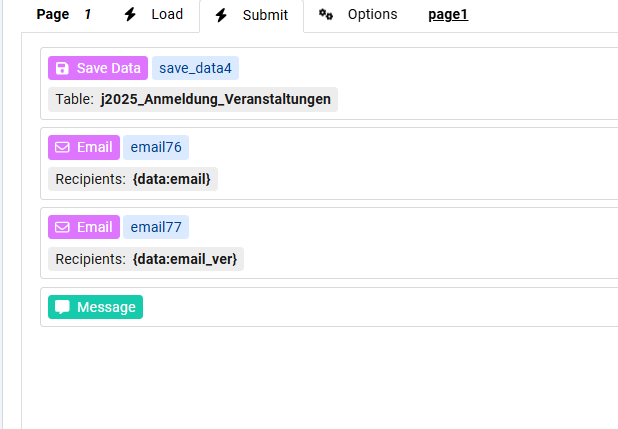
The form submit does work far as as the data are stored cortrectly into the table and the first email is sent correctly to the given address, however not to the second email. Email checked and it is OK and also tried to remove the underline from the address but with no success..Does joomla 6 not allow multiple email sending??

Hi kraadde
You have some email library or plugin which does some email processing before the email is sent, this library fails at some point:

You need to find why it fails or disable it, the image you posted does not show the error message
Max, strange, but the first email is sent correctly and when i siable the second email the first is sent and no erroe message anymor!
so it's some setting in the 2nd email which triggers the problem, what is the error message ?
But the librery is part of the Joomla core. See below. google say:
Yes, the{Link: algo26-matthias/idna-convert https://github.com/joomla/joomla-cms/issues/46688}library is part of the core dependencies in Joomla 6, often located inlibraries/vendor/algo26-matthias/idna-convert. It is used for handling internationalized domain names and was updated to version 4.2+ to improve PHP 8.5 compatibility and email-to-punycode conversion in the CMS.Key Details Regarding Joomla 6 and idna-convert:
- Version Update:Joomla 6 has updated this library (specifically to v4.2.1) to fix issues with PHP 8.5, as mentioned inthis Joomla Issue Tracker report.
- Deprecation Notice:Earlier in the Joomla 6 development (e.g., 6.0.2), a
Non-canonical cast (binary)deprecation notice was triggered by this library on PHP 8.5, which has been addressed inthis GitHub issue. - Functionality:It is used inJoomla 6 to handle email conversions to Punycode, such as in email cloaking functionality.
If you are seeing errors related toalgo26-matthias/idna-convertin Joomla 6, ensure your CMS is updated to the latest version to include the necessary library updates.
The settings of both emais are equal, besides the address.
Ok, what is the error message ?
And please try to switch the order of the 2 emails, does the first email still get sent or not ?
Max,
Maybe I found the solution. The first Email (email76) was always working perfectly
The settings of the (email77) included in the entry in the reply email : {data:email}.
I removed the entry in the reply email and suddently everything works, both email are sent and no more 101 error
Is that a possible bug?
And that was the error message:
Die angeforderte Seite konnte nicht gefunden werden.
Während der Anfrage ist ein Fehler aufgetreten.
Die Seite kann nicht angezeigt werden, weil:
- einveraltetes Lesezeichenaufgerufen wurde.
- einefalsche Adresseaufgerufen wurde.
- über eine Suchmaschine einveralteter Index dieser Websiteaufgerufen wurde.
- keine Zugriffsrechtefür diese Seite vorhanden sind.
Zur Startseite wechseln
Bei Problemen ist der Administrator dieser Website zuständig.
101Prohibited input U+00000020
No, this is not a bug, if your Email server (SMTP or PHP) has specific Reply Email restrictions then this will happen, that's why it is recommended to test the email with minimal settings first.
Are you mentionning the
- SPF (Sender Policy Framework)which is activated on my email server? But this is the case since the webpage was creaded and never was a problem ..
Regards
Adriano
Hi Adriano
You can try a different Reply Email, or a Reply Email @the same domain, usually this depends on the mailing server settings, do you have other email actions with Reply Email which are working fine ?

