Dear All,
In the past, I created forms with Chronoform 8 and added an Altcha and it worked all fine. Today, I wanted to do that for another website (also Joomla - same versions) and I continuously get the error "Verification failed. Try again later." when I try to verify/pass the Altcha test. There is a key as part of the Altcha entry, I have tried copying the key from the working form, because they are sites on different sub-domains (so same server) but that did not make a difference. I have removed and added the Altcha again and no difference.
The form is based on the demo form for contact, with some minor adjustments (an added drop down and then the Altcha).
The Joomla Captcha - Altcha plugin is installed and enabled and setup in an identical manner to the other site.
Any suggestions on where this is going wrong ?
Thanks,
W

Hi wmelis
ChronoForms8 has it's own Altcha plugin so only the settings in the form matter.
When you drag a new altcha view to the form, it will generate a secret key for you, does it work when you leave that key as its ? if not then does your browser console show any errors ?
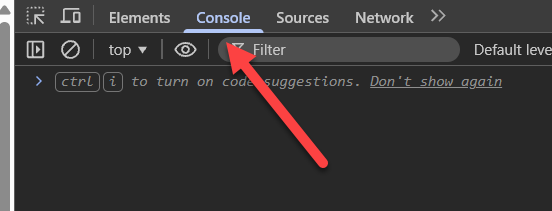
To view the browser's console, open the form then try Altcha then press F12:
Dear Max,
I removed the existing Altcha, even though it had a secret key and put a new one, there is a new secret key there, but if I try, I still get the error. When I go to the console it complains about the Altcha.js file, more specifically line 2237. I have added screenshots of the console, and then the reference to the file itself where it seems to go wrong. You can see I tried twice, and the error is the same. As stated earlier, it is working on another site from the same computer, so I am guessing they may not have the same source code even though they are both fully up to date with regards to Joomla (version 5) and all the plugins/extensions.
Regards,
Wim
I think your Altcha Joomla Captcha plugin is loaded on the same page of ChronoForms and it conflicts with the one in ChronoForms8, because ChronoForms loads the file altcha.min.js but not the altcha.js file you have in the error
Please try to disable the Joomla plugin for altcha and check that ?
It has to be something different, as I disabled the Joomla plugin and the error is still there. I checked the other site on which it all works and the Joomla plugin is active there and it seems that the altcha within chronoforms is working fine there. I have attached the screenshot of the console, which still talks about the same file, even though the plugin is disabled.
I need the form URL to test it myself, possible ?
The page is normally hidden as it does not really work, but I have unhidden it, and it can be found here: https://tnt.wimmelis.pq.lu/index.php/contact-form . This is the one I have problems with.
The other, similar setup that seems to work fine can be found here: https://cu.wimmelis.pq.lu/index.php/contact-form
Hope this helps,
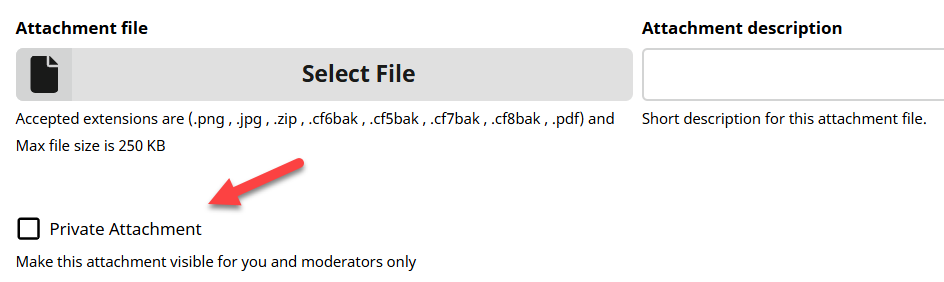
What is different between the 2 forms setups ? please either post screenshots for both forms setup or attach both of them here as Private:
You may also try to download and install the latest ChornoForms8 update over the non working site, do not uninstall first, just install again.
Backup of both forms attached privately.
I think it's a website issue, did you try the update ?
Try to restore the "non working" form on the website where the other form works, does it work there ?
Dear Max,
I restored the backups to the different sites and it is indeed site specific, but they are both fully up to date with same extensions. Can you clarify which update you refer to ? I also tried to reinstall the Joomla core files on the site with problems, but that did not make any difference.
Thanks,
Please download the latest ChronoForms v8 update from our downloads page and install it OVER your install on the "non working" website, then test again and let me know
Downloaded the Chronoform Extension for Joomla and then installed it on the site. Then tested and it has made no difference, still not functioning.
Another site I am working on, fresh install of Joomla and Chronoforms, tried the contact form similar to the other sites, has exactly the same problem with the Altcha not working.
Hi wmelis
Both forms work on my test website here, so it must be something on the non working websites causing this, unfortunately I'm not sure what may be causing this
On the fresh install website, did you install ANY other extensions/modules/plugins beside the ChronoForms8 "extension" ? even other Chrono extensions/modules/plugins ?
On the fresh install, I have also: akeeba backup, JA Extension Manager and Smart Slider 3. Only the Akeeba backup is on the other server was well. I also checked the fresh server's console output and it throws the same error, however the captcha-altcha plugin is not installed there. So, where does this file come from then ? Does it come with Chronoforms ?
I think I made some progress on this matter, and it seems to relate to the Chronoforms package. I suddenly remembered that I have a test site on which I test certain things. Sometimes, I just install do some basic checks, but I never really fully develop, I just do some basic test before I then move on to the actual site. This test site was created around the same time as the one that had a working version of Altcha on Chronoforms. So, I checked and looks like I installed Chronoforms on that test site at the time (which would have been October last year). I then dug back into my downloads to find that version, and that is a file called chronoforms_v8.0.49.zip. The more recent download, I cannot find a version number for, but it also did not come as a zip file, although it might have expanded automatically upon download.
Anyway, I took this older version and uploaded it to both of the sites where I had problems and the Altcha is working fine on both now. So, it seems that something has broken down between this older version and the more recent version of the Chronoform package.
Hope this helps and happy to help with further testing if this helps you identify the problem. As for now, I don't think I will be updating that package for the risk of getting back to where I came from.

