Als ik de door Chronoforms doorgestuurde e-mail (met de inhoud van een ingevuld formulier) van Outlook opsla als .txt bestand dan wordt de opmaak onleesbaar. De tekst uit de mail wordt in stukjes afgebroken en komt helemaal aan de linker kantlijn te staan. Er komen allemaal harde returns in het tekstbestand. Ik heb dat niet met mijn gewone e-mailberichten. Zie bijlage.
Weet iemand waar de oorzaak van dit probleem kan liggen?

Hi Martien
Most probably your email client is reading Plain Text emails but the email sent by ChronoForms is in HTML format (Default)
I have added a format selector in the Email action in the next update:
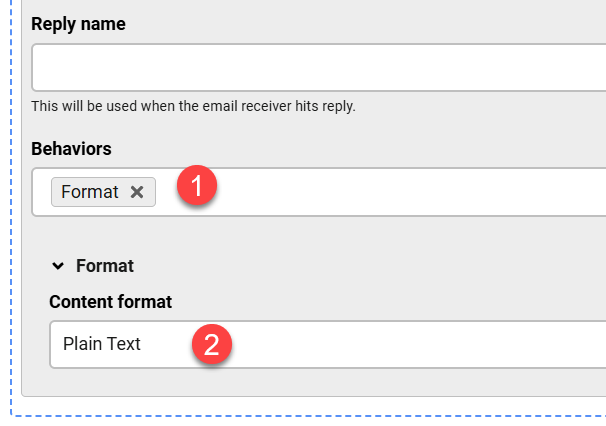
Hallo Max,
Hartelijk dank voor deze snelle reactie. Geweldig.
Hi Max,
Is it possible that the option "format" not yet available in "Behaviors" Chronoengine 8?
Greetings, Martien
Hi Martien
The update has not been released yet since that time, but I think it should be published this weekend.
Hi Max,
After the update (thanks again for the update) I tried both: HTML and PLAIN TEXT. With HTML I have the same problem. With plain text I can indeed read the textlines properly but all the html-tags are also visible. Examples of both als included with this message.
Is there a way to show a clean message without the html-tags?
Greetings,
Martien
Hi Martien
Yes, since your email client has Text processing then you can NOT use HTML mode, or just read the email on an HTML client by forwarding it in your current client.
For TEXT mode, if you have {email:data_table} in your Email action then the output will be in HTML and you will have HTML tags in the email, so you need to enter the Email content in text format yourself, for example:
field1: {data:field1}
field2: {data:field2}
But the next ChronoForms 8 update should do this automatically for you when you have {email:data_table} in the Email content.

