CF7 + Joomla 6 + TinyMCE 8

Enable TinyMCE rich text editor in ChronoForms 7 with Joomla 6.

Overview

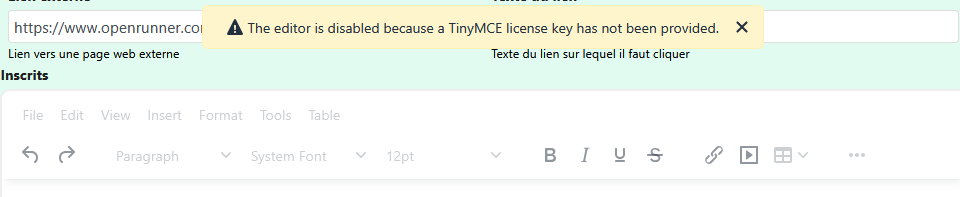
The TinyMCE editor is disabled in CF7 textarea elements because a license key is required by TinyMCE version 8.
Edit the TinyMCE configuration file for CF7 and add the GPL license key parameter to activate the editor.

Answered
ChronoForms v7
Co Colnem 29 Dec, 2025

Hi

I use CF7 with J6 and Tiny MCE 8.

It's ok … except for textarea Element with Rich Text Editor: The editor is disabled because a TinyMCE license key has not been provided

I have an account for TinyMCE, with an API key.

I create a module on site, assigned to all pages in which I write a textarea tag: <textarea>Hello<textarea>.This module works very fine, except when my page contain a CF7 form with a textarea element + Rich Text Editor!

TinyMCE+ Rich Text Editor is OK on CF8. I can't use CF8 for this time because I have too complex forms to rewrite and I'have not the time for the moment.

Have you a soluce for CF7?

Thanks
CF7 + Joomla 6 + TinyMCE 8 image 1

Max_admin Max_admin 29 Dec, 2025
Answer

Hi Colnem

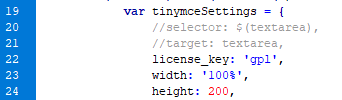
You should add this line in the TinyMCE config settings:

license_key: 'gpl',

That's how v8 make it work without a key, do you know where is the config file for tinymce in v7 ?

Max, ChronoForms developer
ChronoMyAdmin: Database administration within Joomla, no phpMyAdmin needed.
ChronoMails simplifies Joomla email: newsletters, logging, and custom templates.
Co Colnem 30 Dec, 2025
1 Likes

Hi

Found!

Added license_key: 'gpl', in file \plugins\system\chronog3_plg\chronog3\assets\js\g3.tinymce.js

CF7 + Joomla 6 + TinyMCE 8 image 2

So CF7 works very fine with Joomla6 and TinyMCE 8.

Thanks for your help and salute from France

Post a Reply

