Global CSS applied to every page

Apply global CSS to all pages in a ChronoForms 8 form.

Overview

In CF8, the previous method of defining a global CSS in form settings is not directly available.
Add a CSS view to one page, enable Wizard Settings, and name it. Then, use the provided shortcode in an HTML view on other pages to include the CSS.

Answered
ChronoForms v7
hw hwsassisi 24 Dec, 2025

Dear all,

In CF7 it was possible to define a CSS applied to every pages of the form, in form's settings.

How is possible to replicate this feature in CF8?I need to define a CSS once and apply it to 3 pages of my form.

Regards

Merry XMas

     HWS

Max_admin Max_admin 4d ago
Answer

Hi

You can add a CSS view to any of the form pages, enable the Wizard Settings behavior and set a name for the CSS view, then call that view using the {view:css_view_name} shortcode in other pages using an HTML view
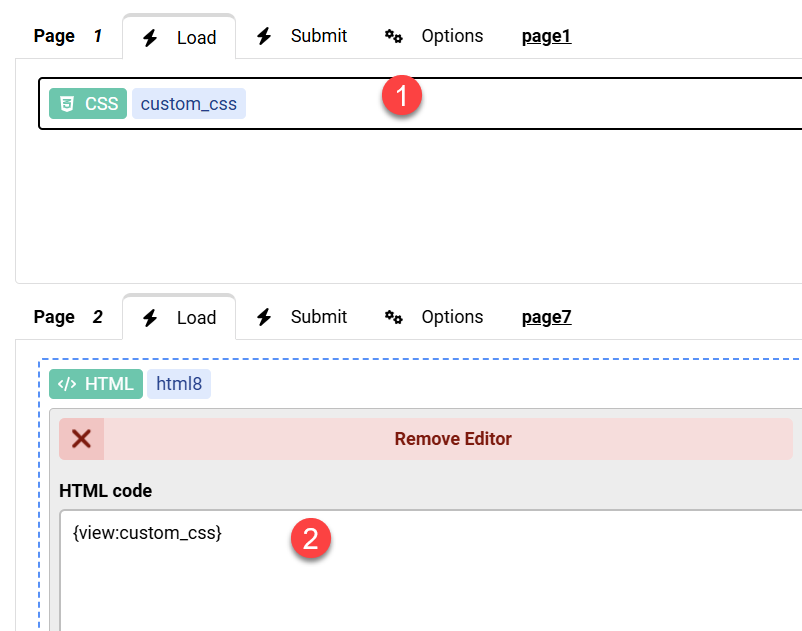

Global CSS applied to every page image 1

Max, ChronoForms developer
ChronoMyAdmin: Database administration within Joomla, no phpMyAdmin needed.
ChronoMails simplifies Joomla email: newsletters, logging, and custom templates.
Post a Reply
