Dear all,
in CF7 I was using a form with 2 radios-groups with the same id.This was usefull because it was possible to put a graphic separator between the first group and the second group.
For instance, my 2 radios-groups were called "room-type" and in the first group the options were "single with view", "double with view".In the second "room-type" radios-group, the options were "single without view", "double without view".Using 2 radios-groups, it was possible to insert the first group in a container with a border title and the second group in another container with another title.
When the user selects the "single with view", the options from the second radios-group were deselected.When the user selects the "double without view", the options from the first radios-group were deselected.At submit phase, I just get the {data:room-type} value.
Now, in CF8, if I create two radios-groups with the same id, when I click an options of the second radio-group, the option with the same position in first group is selected...
How is possible to replicate the behaviour I was having in CF7?If I have to use 2 radios-groups, how is possible to deselect items from the first group when I select an option from the second group and vice-versa?Using triggers/listeners there's no capability to do this.
Please, let me know
Regards
HWS

Hi
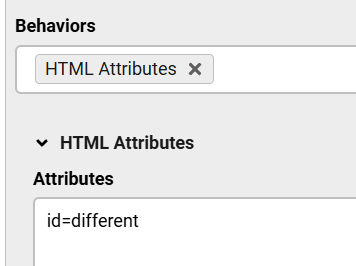
You can achieve the same behavior in v8 using the HTML Attributes behavior, add it to one of the Radio Groups and set a different id:
Magic Max!
This solve the issue. You should write a detailed tutorial about this feature, because it could be usefull the have a large number of radios that have to be splitted in sub-groups.
For instance, if you have to rent a car and if you have to choose the model, it is easyer to have a "car-model" radio group with the following user interface:
Electric cars
- Tesla Model 3
- Renault 5 E-Tech
- Audi Q6 e-tron
Internal combustion engine
- Ford Fiesta
- Alfa Romeo Giulia
- BMW X3
Regards
I agree, but now since it's here on the forums, it can be found too.

