Error message language

Change the language of ChronoForms system error messages on a multilingual Joomla site.

Overview

The issue is that certain system error messages, like file size or duplicate file errors, were not translatable using the standard language override methods.
Use the new Errors behavior added to the File field in CF v8.0.50 to configure and translate these specific error messages.

Answered
ChronoForms v8
dy dyannabia 06 Nov, 2025

I’m using ChronoForms on a multilingual Joomla website and I would like to change the language of some system error messages. 

For example, when uploading a file that’s too large, ChronoForms shows “Sorry, your file is too large, the maximum file size is …”. For other validation messages (like required fields), I can use the {l: } syntax to display the message in the active site language, but I can’t find a way to do that for this error.

Is there a similar method or a place where I can override or translate this message depending on the language? 

Max_admin Max_admin 07 Nov, 2025
Answer

Hi dyanna

I have added a new Errors behavior to the File field to be able to configure this:
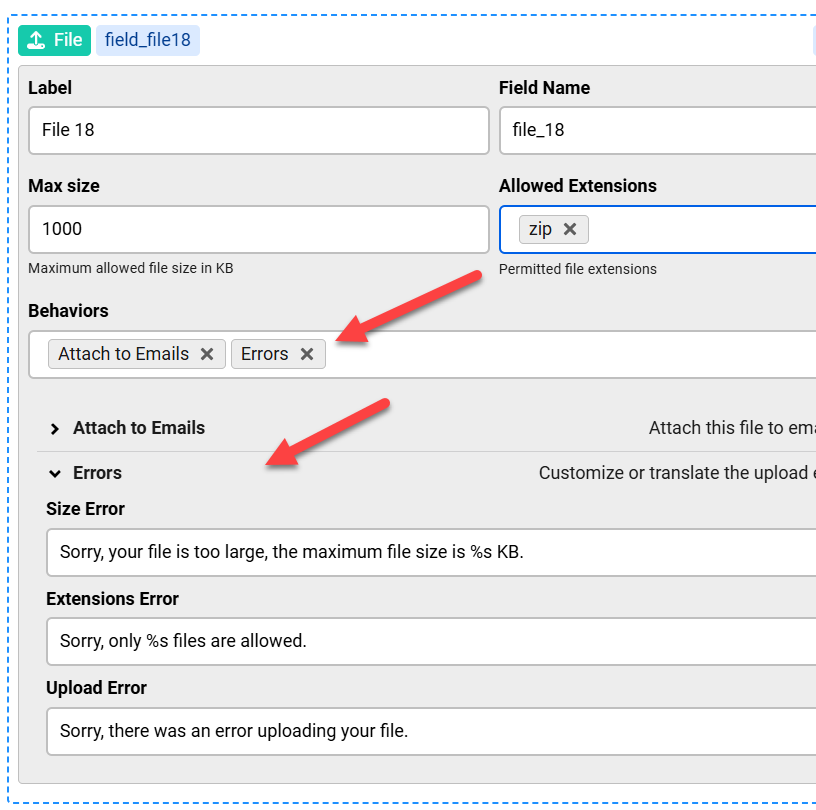
Error message language image 1

This will be available in the update v8.0.50

Max, ChronoForms developer
ChronoMyAdmin: Database administration within Joomla, no phpMyAdmin needed.
ChronoMails simplifies Joomla email: newsletters, logging, and custom templates.
dy dyannabia 15 Nov, 2025
1 Likes

Hi Max,

Thank you so much for adding the new Errors behavior!

I wanted to ask if there’s a way to change also “Sorry, file already exists”.

Thanks again!

Max_admin Max_admin 15 Nov, 2025

Hi dyanna

I forgot this one, I have added it in the next update.

Max, ChronoForms developer
ChronoMyAdmin: Database administration within Joomla, no phpMyAdmin needed.
ChronoMails simplifies Joomla email: newsletters, logging, and custom templates.
Post a Reply
