Upload files and define upload directory

Define a custom upload directory in ChronoForms.

Overview

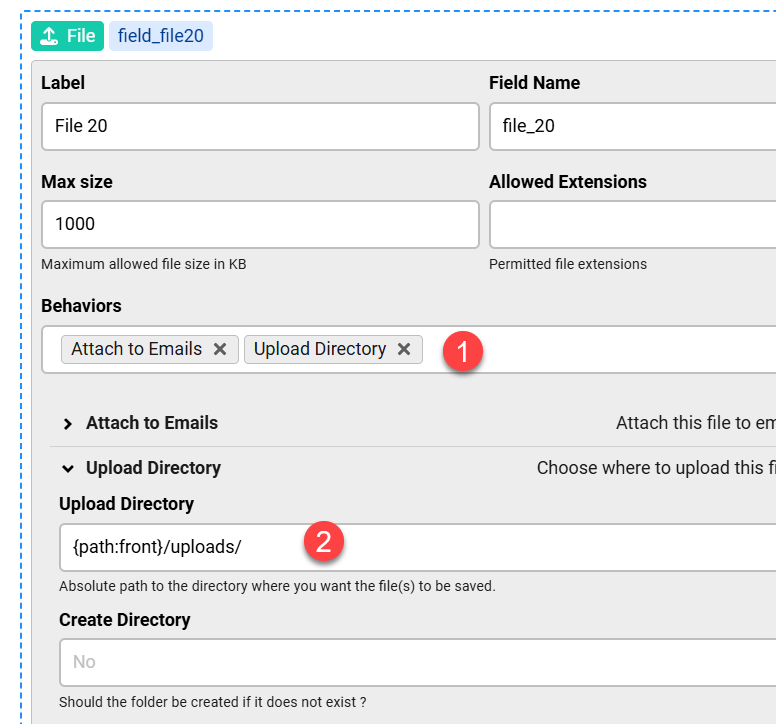
The upload directory path was missing a trailing slash, causing files to not save to the intended subfolder.
In the File Field's Upload Directory setting, ensure the path ends with a forward slash.

Answered
ChronoForms v8
kr kraadde 28 Oct, 2025

File upload works, but how to define the upload directory, i.e. /components/com_chronofiles8/upload/subfolder 1?

Max_admin Max_admin 28 Oct, 2025
Answer

Using the Upload Directory behavior in your File Field settings:
Upload files and define upload directory image 1

Max, ChronoForms developer
ChronoMyAdmin: Database administration within Joomla, no phpMyAdmin needed.
ChronoMails simplifies Joomla email: newsletters, logging, and custom templates.
kr kraadde 28 Oct, 2025

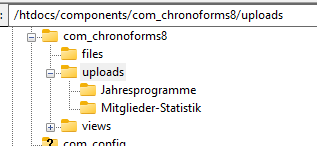
means that the following  setting:{path:front}/uploads/Jahresprogramme

should be the directory where the uploaded files are located.

 But this is not the case although the directory is indeed  existing:
kr kraadde 28 Oct, 2025
1 Likes

Solved ! the backslash was missing here: {path:front}/uploads/Jahresprogramme/

Max_admin Max_admin 28 Oct, 2025

Thanks for posting the final solution.

Max, ChronoForms developer
ChronoMyAdmin: Database administration within Joomla, no phpMyAdmin needed.
ChronoMails simplifies Joomla email: newsletters, logging, and custom templates.
Post a Reply
