Square brackets in email confirmation

Remove square brackets from checkbox values in ChronoForms email confirmations.

Overview

The issue occurs when using the standard {data:field_name} placeholder for checkbox fields, which outputs the selected values as an array including square brackets.
Replace the placeholder with {data.join:field_name} in your email template to display only the selected text values without brackets.

Answered
ChronoForms v8
gabi gabi 02 Sep, 2025

I have a checkbox field in my form. It is working fine, but the choice is shown with square brackets in the e-mail.

Is there a way to avoid the square brackets and only show the text?

Using this in the field in the e-mail: {data:begynder_workshop}
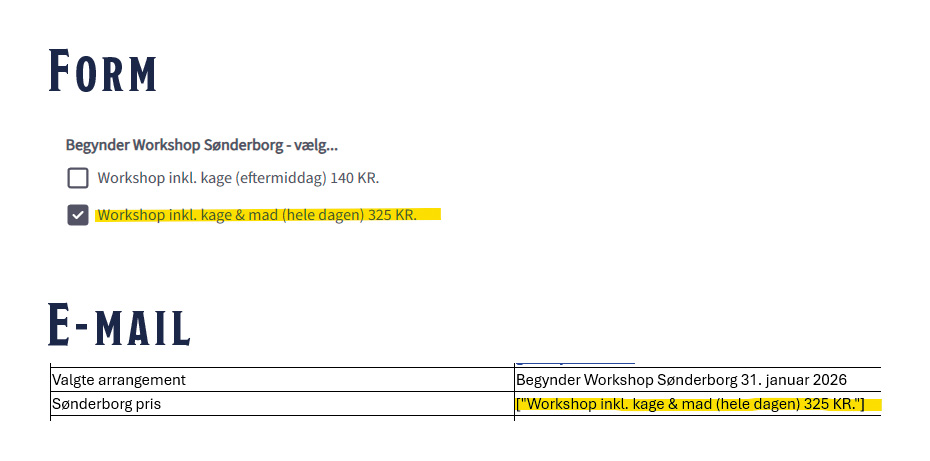
My form

Max_admin Max_admin 04 Sep, 2025

Hi gabi

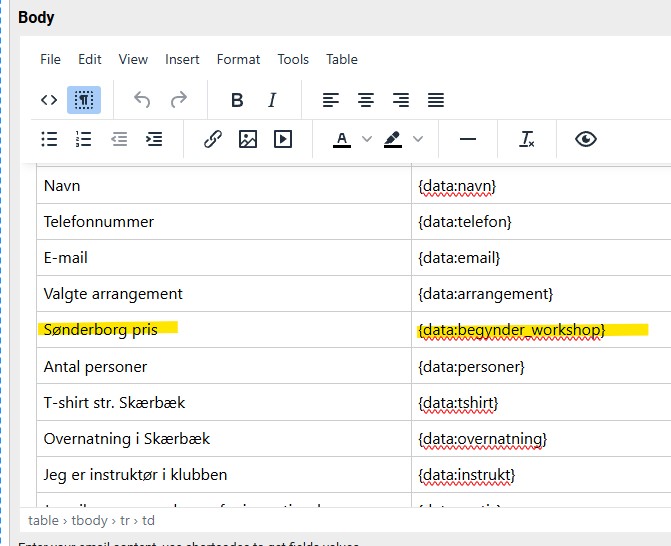
What do you have in your Email template ?

Max, ChronoForms developer
ChronoMyAdmin: Database administration within Joomla, no phpMyAdmin needed.
ChronoMails simplifies Joomla email: newsletters, logging, and custom templates.
gabi gabi 06 Sep, 2025

Hey Max

Are you asking for the code?

Sønderborg pris {data:begynder_workshop}
Max_admin Max_admin 06 Sep, 2025
Answer
1 Likes

Please change this to

{data.join:begynder_workshop}

Does it solve the issue ?

Max, ChronoForms developer
ChronoMyAdmin: Database administration within Joomla, no phpMyAdmin needed.
ChronoMails simplifies Joomla email: newsletters, logging, and custom templates.
gabi gabi 06 Sep, 2025

Hey Max

Thank you so much

Looks much better now ;) 

Max_admin Max_admin 11 Sep, 2025

Great! 😉

Max, ChronoForms developer
ChronoMyAdmin: Database administration within Joomla, no phpMyAdmin needed.
ChronoMails simplifies Joomla email: newsletters, logging, and custom templates.
Post a Reply


