Hi
Have created a form and inserted a read from database action, within this I have a put a SQL query to sum a column of prices.
What I want to do is then display the result. I've added test box and tried and display the result, but no result is displayed.
I've looked through forum and elsewhere for some examples of how to do this, the above is just how I thought it might work without having to enter any PHP code.
Any advice appreciated.
Regards
GMS

Hi Graeme
The tutorial below explains how to read data from a database table then list it using a Table view in ChronoForms 8:
https://www.chronoengine.com/faqs/chronoforms/chronoforms8/create-a-table-list-in-chronoforms8
Hi Max
Thank for the quick response. I have seen this page before. I might be wrong, but it's expect all the data to be displayed to come from the DB.
Whereas what I am trying to do is execute an SQL query as part of the read db action (SQL query is summing price fields from the DB to create a total e.g creating the result on the fly to then populate the form. I don't see any SQL query in the tutorial).
Apologies, fairly new to this, so what I might be trying to do, whilst seems to be to logical to me, might not be who to actually go about this..
Regards
You do not need a custom SQL if you need to add a sum field, you can use the Fields behavior to add your fields to the fields list:
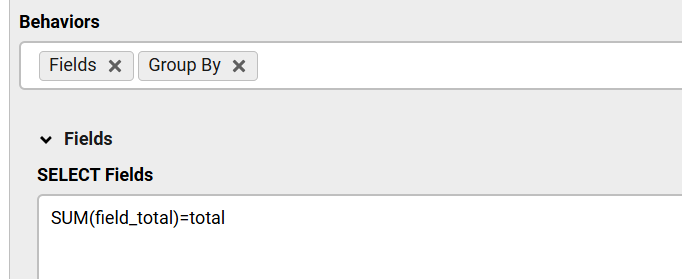
And the Group By behavior to group by the table primary key
Let me know if this does not work

Hi Graeme
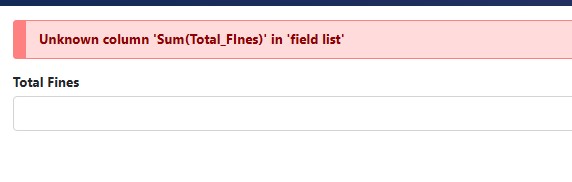
This requires a code fix available in the next update.
What is your deadline for the form ?

