improve CF8

How to identify containers and multifield areas in CF8 after saving.

Overview

The unique identifiers for containers and multifield areas disappear upon saving, making it difficult to troubleshoot event triggers and listeners.
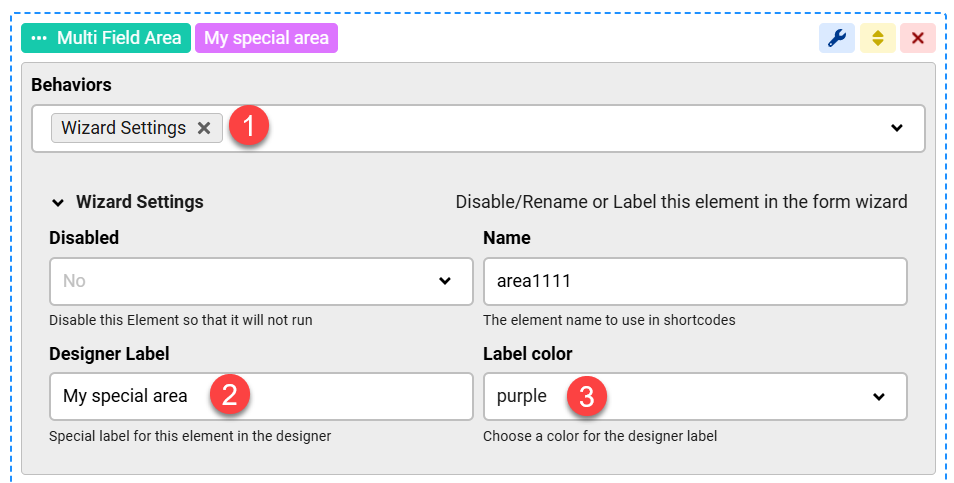
Use the Wizard Settings behavior to assign and retain labels for these elements, allowing for clear identification during form management.

Answered
ChronoForms v8
kr kraadde 06 Jun, 2025

I suggest an improvement of the CF8. 

If using containers or multifield areas, the indication (like area_multi_field121 or area_container122) disappeare after saving the page.

Troubleshooting becomes quite painful when checking event trigger and event listener. Unlikely the PHP action fields that have indeed an identifier like php123.

Otherwise a great forms app.

Max_admin Max_admin 08 Jun, 2025

Hi kraadde

Why do you need the identifier for the Triggers or Listeners ? could you please explain more ?

Max, ChronoForms developer
ChronoMyAdmin: Database administration within Joomla, no phpMyAdmin needed.
ChronoMails simplifies Joomla email: newsletters, logging, and custom templates.
kr kraadde 09 Jun, 2025

I will try to explain better:

I have setup following event triggers in one of my fields:
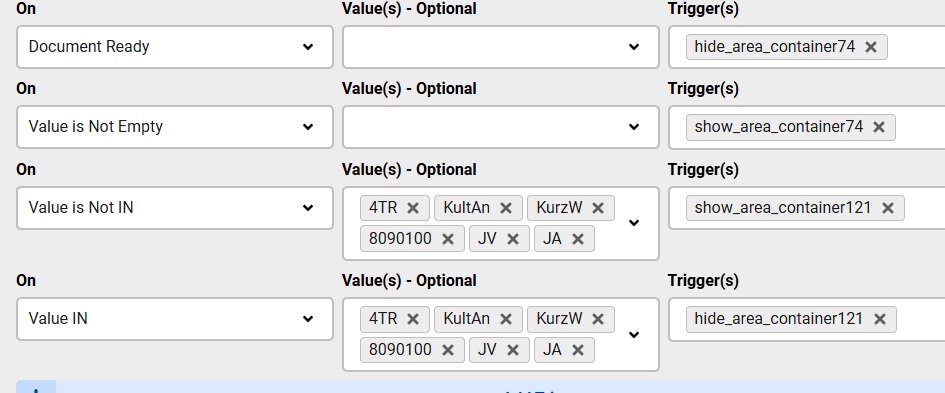
and the containers look like that :
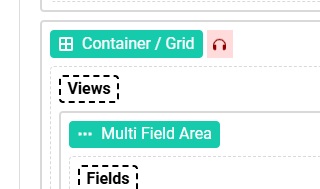
as you see, there is no way to identify which container is which. 

unlike the following:
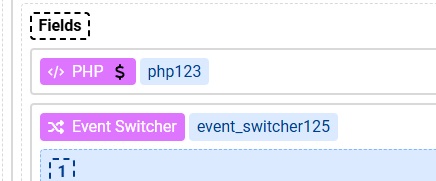
that have lables ( php123 and enedt scwitcher125) that makes easy to troubleshooting.

Max_admin Max_admin 09 Jun, 2025
Answer

You can do that using the Wizard Settings behavior:
improve CF8 image 1

Max, ChronoForms developer
ChronoMyAdmin: Database administration within Joomla, no phpMyAdmin needed.
ChronoMails simplifies Joomla email: newsletters, logging, and custom templates.
Post a Reply

