trigger event from single checkbox

How to use a single checkbox to control the visibility of another field in CF.

Overview

The issue arises because the standard checkbox configuration does not automatically trigger visibility changes for other form fields.
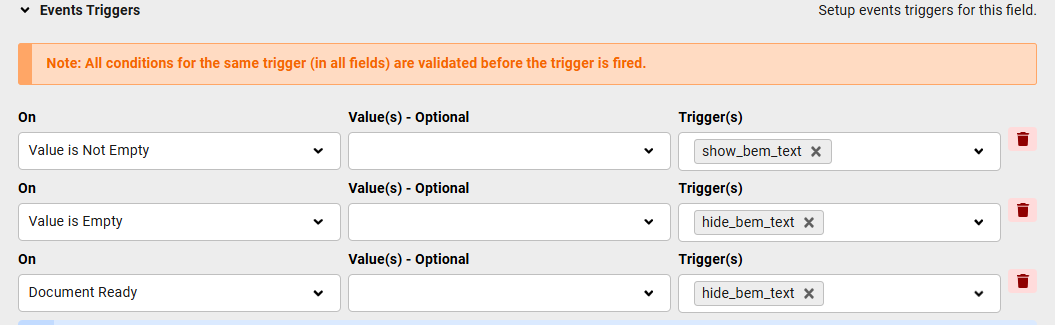
Use the CF event trigger with "Value is Empty" for unchecked and "Value is Not Empty" for checked states, then apply a show/hide listener to the target field.

Answered
ChronoForms v8
kr kraadde 23 May, 2025

is it possible to use a single checkbox to trigger visibility of an other field?

I see no solution. Can you help?

Max_admin Max_admin 27 May, 2025
Answer

Hi kraadde

Glad you found the solution, what was the solution you found for other users ?

The "Value is Empty" and "Value is Not Empty" triggers can be used for "not checked" and "checked"

Max, ChronoForms developer
ChronoMyAdmin: Database administration within Joomla, no phpMyAdmin needed.
ChronoMails simplifies Joomla email: newsletters, logging, and custom templates.
kr kraadde 27 May, 2025
1 Likes

Yes, I used event trigger

 {item:title} {images:#}

and listener show/hide on the field bem_text

Max_admin Max_admin 28 May, 2025

Thank you for sharing the solution! :)

Max, ChronoForms developer
ChronoMyAdmin: Database administration within Joomla, no phpMyAdmin needed.
ChronoMails simplifies Joomla email: newsletters, logging, and custom templates.
Post a Reply