Calendar Tools "Year" & "Month" header on date picker

Translate the calendar date picker headers in ChronoForms.

Overview

The "Month" and "Year" headers in the calendar field were hardcoded in English.
Update to the latest version of ChronoForms, where a new setting allows you to customize or translate these headers directly without editing core files.

Answered
ChronoForms v8
Bi BigStef 27 Jan, 2025

Hi there :)

I have added a calendar field on my form.

When I modify or type a date, I have a header with "Month" and "Year" on top of the 2 columns (screenshot : https://share.cleanshot.com/ZwCmXXSP9cyjbZdCvc57 )

The only way I found to translate it in french is to modify the libraries/chrono_lib/assets/nui.min.js file and type "Année" instead of "Year" and "Mois" instead "Month" in that file.

Work well : https://share.cleanshot.com/56MQlpMqTylcQPjsx7SY 

But I'm not sure it is the best practise. Any advice ?

Max_admin Max_admin 27 Jan, 2025
Answer
1 Likes

Hi

Thank you for the notice, this feature will be available in the next update:
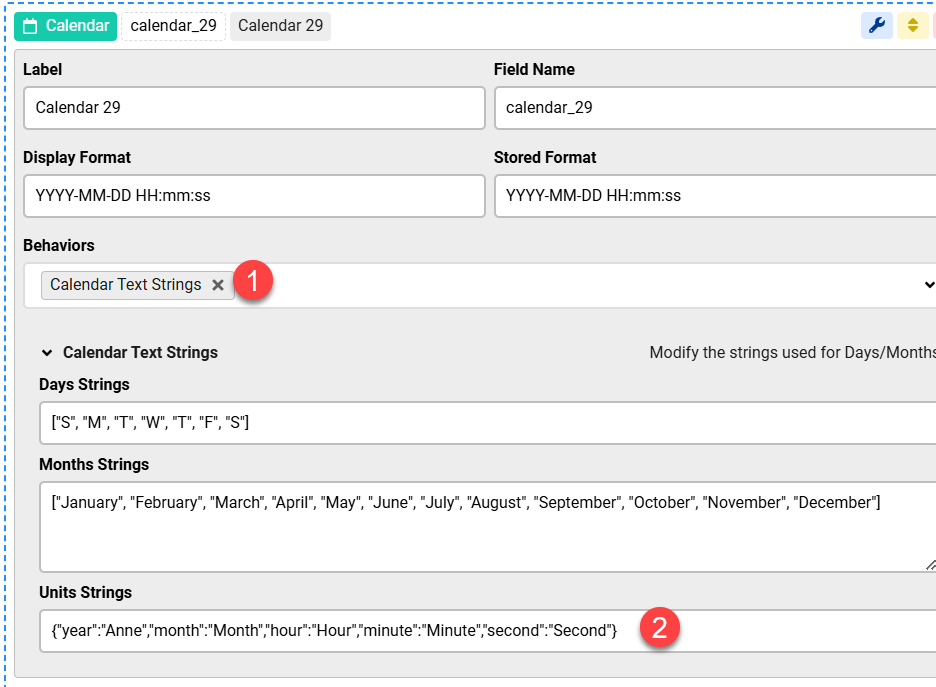
Calendar Tools

Max, ChronoForms developer
ChronoMyAdmin: Database administration within Joomla, no phpMyAdmin needed.
ChronoMails simplifies Joomla email: newsletters, logging, and custom templates.
Bi BigStef 31 Jan, 2025

Great ! :)

Thanks for your fast answer about that...

Max_admin Max_admin 11 Feb, 2025
1 Likes

I have just released the new update which has this new setting :)

Max, ChronoForms developer
ChronoMyAdmin: Database administration within Joomla, no phpMyAdmin needed.
ChronoMails simplifies Joomla email: newsletters, logging, and custom templates.
Bi BigStef 11 Feb, 2025

Hi Max, thanks ! You rocks to keep that kind of reminder in your agenda :-) 

Max_admin Max_admin 11 Feb, 2025

you are welcome! :)

Max, ChronoForms developer
ChronoMyAdmin: Database administration within Joomla, no phpMyAdmin needed.
ChronoMails simplifies Joomla email: newsletters, logging, and custom templates.
This topic is locked and no more replies can be posted.

