A table
name: articles_list
Data provider: {var: read_articles}
Column list:
Beobs.datum:Datum
Beobs.beobachtung:Beobachtung
Article.fundort:Fundort
Author.name:Beobachter
Article.teilnehmer:Teilnehmer
I have a filter with a dropdown box
name: field_filter_fundorts
option: {var:read_filter_fundorte}
Function:
name: read_filter_fundorte
Fields to retrieve: fundort
The filter works with "fundort". The locality is displayed in the drop-down box for selection.
The problem is, I have to see more than "fundort" in the dropdown box.
I've tried using the option in Fields to retrieve:
CONCAT (Beobs.datum, ',', beobachtung, ',', fundort): field_filter_fundorts
Then the filter will not work anymore.
What can I do to make the datum, beobachtung, fundort drop-down box appear, and still the filter on the spreadsheet work?
Many Thanx
F.
name: articles_list
Data provider: {var: read_articles}
Column list:
Beobs.datum:Datum
Beobs.beobachtung:Beobachtung
Article.fundort:Fundort
Author.name:Beobachter
Article.teilnehmer:Teilnehmer
I have a filter with a dropdown box
name: field_filter_fundorts
option: {var:read_filter_fundorte}
Function:
name: read_filter_fundorte
Fields to retrieve: fundort
The filter works with "fundort". The locality is displayed in the drop-down box for selection.
The problem is, I have to see more than "fundort" in the dropdown box.
I've tried using the option in Fields to retrieve:
CONCAT (Beobs.datum, ',', beobachtung, ',', fundort): field_filter_fundorts
Then the filter will not work anymore.
What can I do to make the datum, beobachtung, fundort drop-down box appear, and still the filter on the spreadsheet work?
Many Thanx
F.
post update:
Where condition:
fundort / LIKE / %{data:field_filter_fundorte}% / Use
Fields to retrieve: fundort
The filter works perfectly.
The problem is: In the dropdown field "field_filter_fundorte" also Beobs.datum, Beobs.beobachtung to "fundort" should be displayed.
it does not work with:
CONCAT(Beobs.datum , ', ' , Beobs.beobachtung, ', ', Article.fundort):field_filter_fundorte
CONCAT(Beobs.datum , ', ' , Beobs.beobachtung, ', ', Article.fundort):fundort
fundort:CONCAT(Beobs.datum , ', ' , Beobs.beobachtung, ', ', Article.fundort)
...
Where condition:
fundort / LIKE / %{data:field_filter_fundorte}% / Use
Fields to retrieve: fundort
The filter works perfectly.
The problem is: In the dropdown field "field_filter_fundorte" also Beobs.datum, Beobs.beobachtung to "fundort" should be displayed.
it does not work with:
CONCAT(Beobs.datum , ', ' , Beobs.beobachtung, ', ', Article.fundort):field_filter_fundorte
CONCAT(Beobs.datum , ', ' , Beobs.beobachtung, ', ', Article.fundort):fundort
fundort:CONCAT(Beobs.datum , ', ' , Beobs.beobachtung, ', ', Article.fundort)
...
Array
(
    [log] => Array
        (
            [0] => SELECT `Article`.`fundort` AS `Article.fundort` FROM `mtb_beobachtung_fundort` AS `Article` LEFT JOIN `mtb_beobachtung` AS `Beobs` ON `Article`.`beo_id` = `Beobs`.`beo_id` WHERE `Article`.`user_id` = '909' AND CONCAT(`Beobs`.`datum` , ', ' , Beobs.beobachtung, ', ', Article.fundort) LIKE '%%';
        )

    [var] => Array
        (
            [Pasewalk am Straßenrand, UM] => Pasewalk am Straßenrand, UM
            [Klosterfelde am Waldrand, BAR] => Klosterfelde am Waldrand, BAR
        )

)
CONCAT (model.field , ' - - ' , model.otherfield):model.alias
Need spaces surrounding all commas and the alias needs the model name
Need spaces surrounding all commas and the alias needs the model name
That would be too easy ... :-)
Actually, it should look like the screen. The date can also be up front.
I have already managed that "date, observation, location" in the drop-down box.
But if I want to filter a dataset then we will see an empty table underneath.
Only if I have the "fundort" in the dropdown box and select a locality, will a result be displayed.
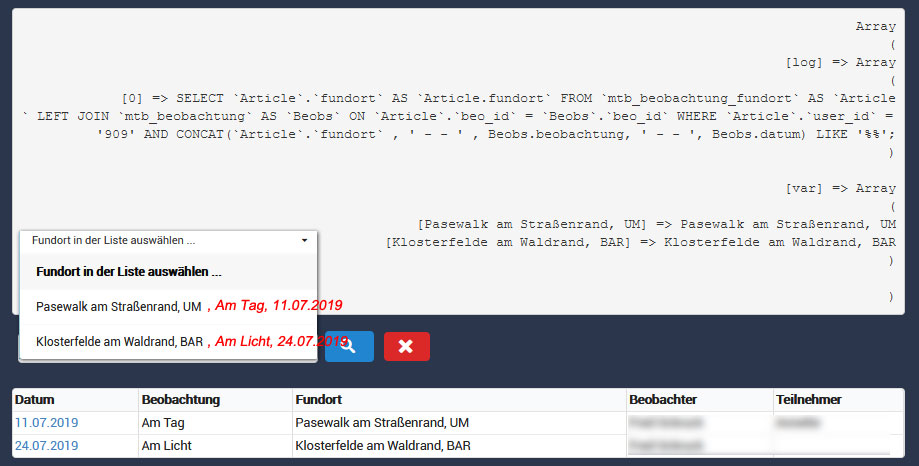
Actually, it should look like the screen. The date can also be up front.
I have already managed that "date, observation, location" in the drop-down box.
But if I want to filter a dataset then we will see an empty table underneath.
Only if I have the "fundort" in the dropdown box and select a locality, will a result be displayed.
This topic is locked and no more replies can be posted.

