Published:
Overview
This guide explains how to control date selection limits in Chronoforms8 calendars. You can enable the Date/Time Limits behavior and use shortcodes to set the start date to today and the end date to one week in the future. Ensure the date format matches the calendar's stored format for proper functionality.
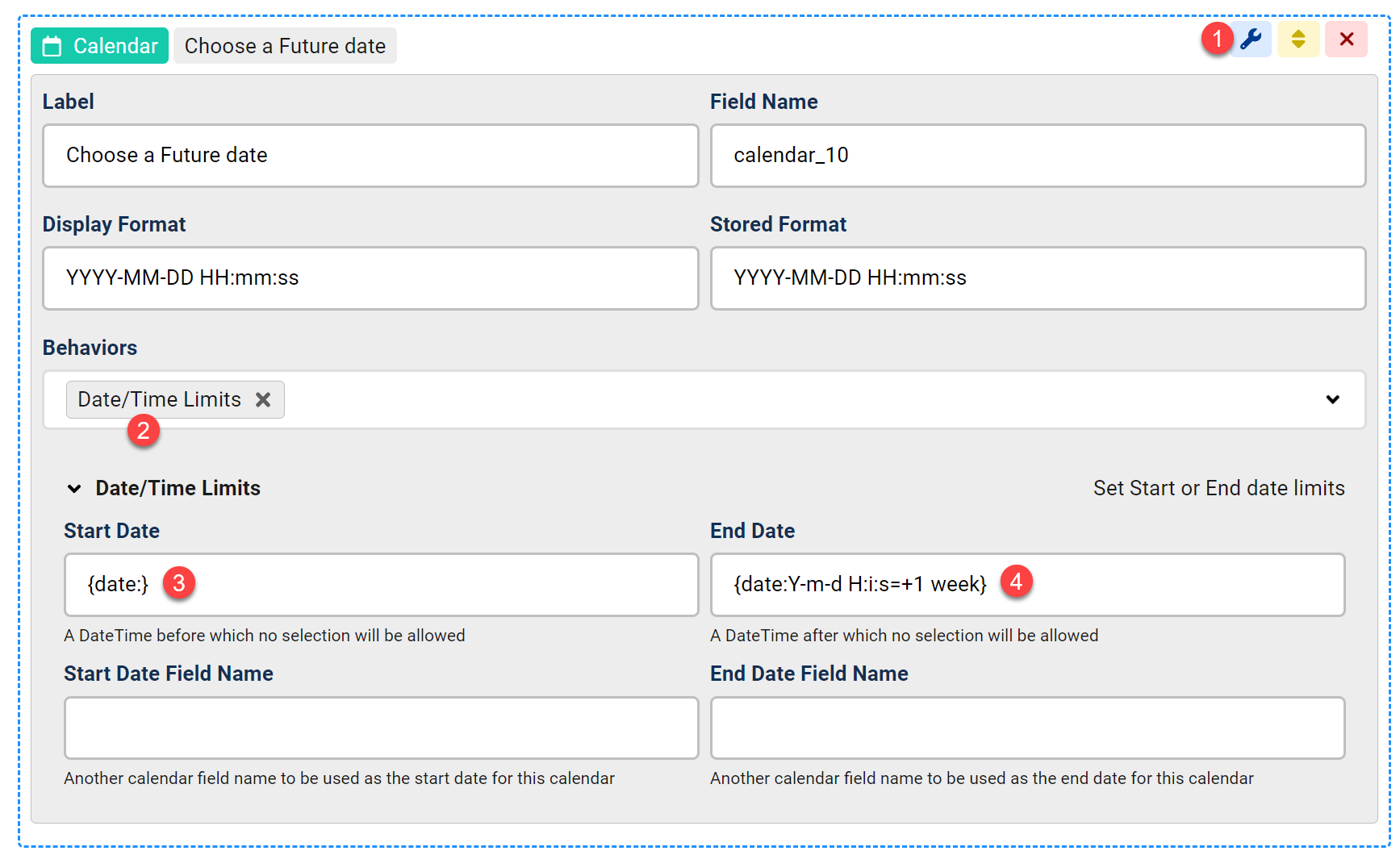
In Chronoforms8 you can control the limits between which the calendar is allowed to select dates, here is how to do this:
- Open your calendar field for editing
- Enable the Date/Time Limits behavior
- In order to set the start date to Today, we set the start date to {date:} which is a Chronoforms8 shortcode returning the current date time in MySQL format: Y-m-d H:i:s
Please note that the date format should match the Calendar "stored format" - In order to set the End Date to 1 week in the future, we set the End Date field to "{date:Y-m-d H:i:s=+1 week}", which will return the date after 1 week (hence the +1 week) in the same MySQL format (stored format)


Comments