Change the calendar field to a date text field

How to change a calendar field to a date text field in ChronoForms.

Overview

The problem is that the calendar control requires multi-step selection, which is less convenient than a simple date text field.
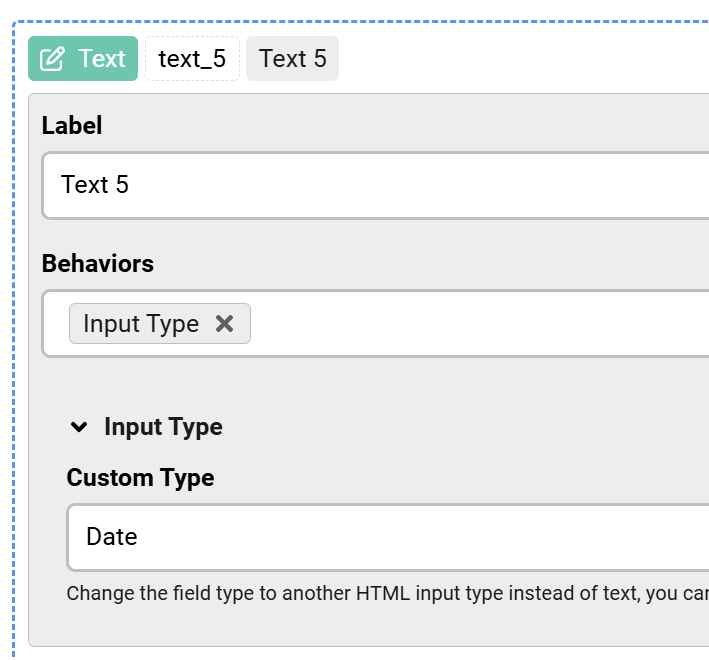
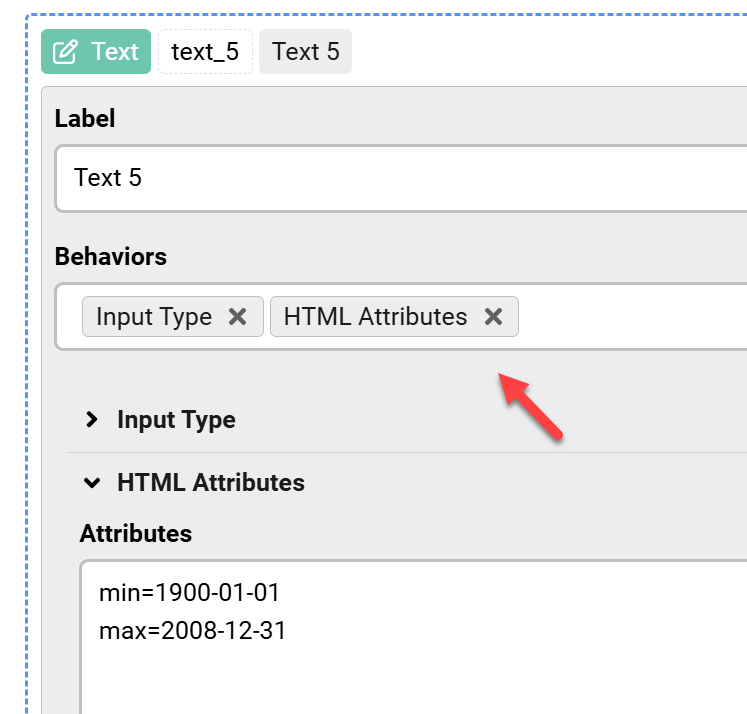
Replace the calendar field with a normal text field, then enable the Input Type behavior and set it to Date. Optionally, use the HTML attributes behavior to set min and max date limits.

Answered
ChronoForms v8
Be Ben1265 12h ago

I have a membership application form that contain a birth date field. The calendar control requires the user to select the year, then scroll to the right month and then pick on the date. It would be simpler to present the user with something like MM/DD/YYYY for them to simply fill-out. Is that possible?

Max_admin Max_admin 44m ago
Answer

Hi Ben

Sure, you can have a normal text field and enable the Input Type behavior and set it to Date:
Change the calendar field to a date text field image 1

and with the HTML attributes behavior you can set the max and min dates possible:
Change the calendar field to a date text field image 2

Max, ChronoForms developer
ChronoMyAdmin: Database administration within Joomla, no phpMyAdmin needed.
ChronoMails simplifies Joomla email: newsletters, logging, and custom templates.
Post a Reply

