How to get auto increment primary key from "save data" action

ki kittisak 28 May, 2025

Hi Max,

Could you tell me how to get auto increment primary key from "save data" action? I need to use the new record's auto increment primary key for save as the second table data.

Regards,

Kittisak

Max_admin Max_admin 28 May, 2025
Answer
1 Likes

Hi Kittisak

Use the {var:save_data_name.id} shortcode or use PHP:

$this->get("save_data_name.id")

the exact name and "id" field name depends on your save data and table, so check the form debug for that

Max, ChronoForms developer
ChronoMyAdmin: Database administration within Joomla, no phpMyAdmin needed.
ChronoMails simplifies Joomla email: newsletters, logging, and custom templates.
ki kittisak 28 May, 2025

Hi Max,

I had check debug but they do not have id data in save_data action. 

Regards,

Kittisak

Pk Pkoll 28 May, 2025
2 Likes

Don't forget to set in behaviors from the save the Primary Key on and the the name "id" from the table!

Paul

Max_admin Max_admin 28 May, 2025
1 Likes

Hi Kittisak

As Paul has noted, you need to set the primary key in the Save Data behaviors, I forgot this step

Max, ChronoForms developer
ChronoMyAdmin: Database administration within Joomla, no phpMyAdmin needed.
ChronoMails simplifies Joomla email: newsletters, logging, and custom templates.
ki kittisak 13 Aug, 2025

Hi Max,    I have some issue about primary key from save data action.Is it possible to use the new generated primary key from save data action in "Filename Provide" behaviors  of upload file view.I try as the attached picture but It's not work.Best regards,Kittisak

Screenshot 2568-08-13 at 17.01.45.png
I assign "id" as primary key in save data action "save_tbl_product_journey"
Screenshot 2568-08-13 at 17.01.31.png
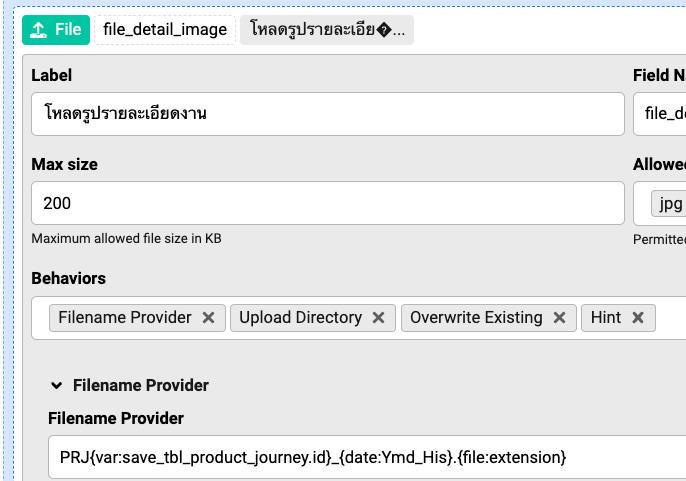
In file upload view, I use "{var:save_tbl_product_journey.id}" as a part of file name provider
Max_admin Max_admin 13 Aug, 2025

Hi Kittisak

Yes you can, there is no image attached, but you can use {var:save_data_name.id} where "id" is the name of the primary key

Max, ChronoForms developer
ChronoMyAdmin: Database administration within Joomla, no phpMyAdmin needed.
ChronoMails simplifies Joomla email: newsletters, logging, and custom templates.
ki kittisak 14 Aug, 2025

Hi Max,

     I try already but It's not work.

Best regards,

Kittisak

Screenshot 2568-08-13 at 17.01.45.png
Screenshot 2568-08-13 at 17.01.31.png
ki kittisak 14 Aug, 2025

Hi Max, 

   I can not attach picture in post.

Best regards,

Kittisak

Private Attachment is only visible to Author & Moderators
Max_admin Max_admin 14 Aug, 2025

yes, it looks like attachments have an issue, I will try to fix this soon

For your question, check the debug after the Save Data, what does it show ? did you set the primary key in the Save Data settings ?

Max, ChronoForms developer
ChronoMyAdmin: Database administration within Joomla, no phpMyAdmin needed.
ChronoMails simplifies Joomla email: newsletters, logging, and custom templates.
ki kittisak 15 Aug, 2025

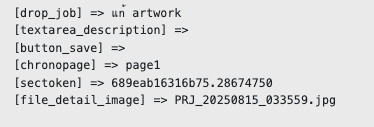
Hi Max,    On the debug after saved data, they show id (primary key) in save data action array correctly but not show in the file name provider.Regard,Kitiisak

Screenshot 2568-08-13 at 17.01.45.png
set primary key in save data action
Screenshot 2568-08-13 at 17.01.31.png
Short code in file name provider
Screenshot 2568-08-15 at 10.38.54.png
id show on debug
Screenshot 2568-08-15 at 10.39.31.png
id not set in the file name
Max_admin Max_admin 15 Aug, 2025

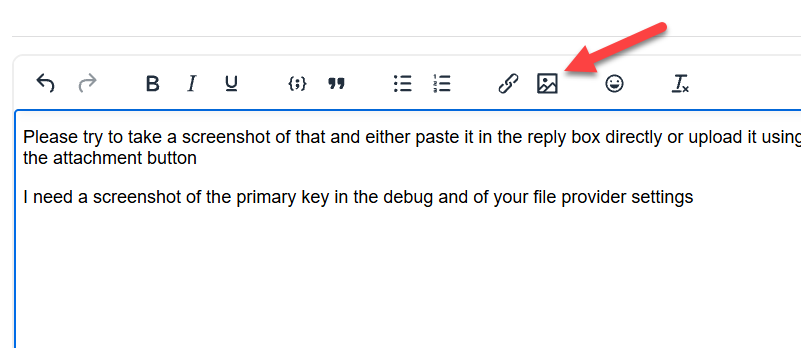
Please try to take a screenshot of that and either paste it in the reply box directly or upload it using the image icon in the reply editor, that would work until I fix the attachment button

I need a screenshot of the primary key in the debug and of your file provider settings
How to get auto increment primary key from

Max, ChronoForms developer
ChronoMyAdmin: Database administration within Joomla, no phpMyAdmin needed.
ChronoMails simplifies Joomla email: newsletters, logging, and custom templates.
ki kittisak 15 Aug, 2025

Hi Max,This is save data action in submit
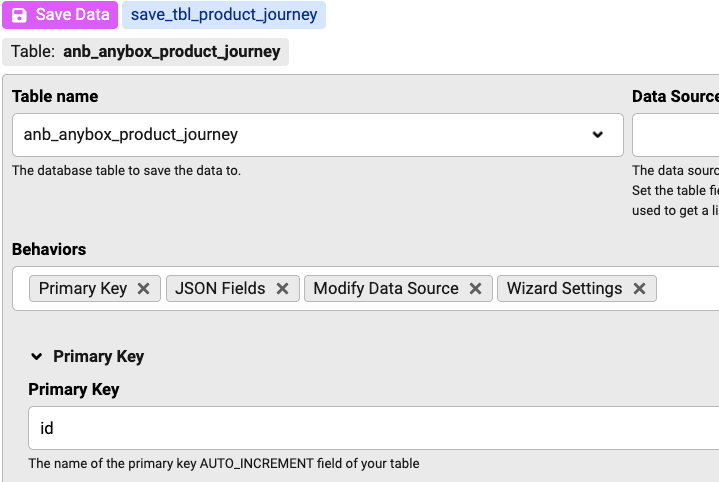
This is upload file and file name provider
In debug, it show id properly
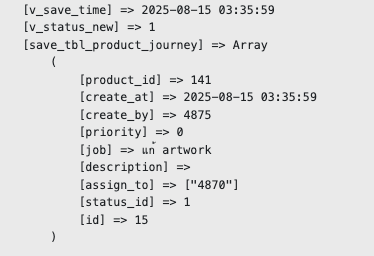
but not set in the file name regards,kittisak

Max_admin Max_admin 15 Aug, 2025

Hi Kittisak

The file upload happens when the form page is submitted and before the Save Data runs, if you need to use the new record id then I think that you will need to have either a 2 pages form and have your file field at 2nd page after the Save Data has provided the ID OR you can keep everything as it's but use PHP to rename the file after it has been created.

Max, ChronoForms developer
ChronoMyAdmin: Database administration within Joomla, no phpMyAdmin needed.
ChronoMails simplifies Joomla email: newsletters, logging, and custom templates.
ki kittisak 17 Aug, 2025

Hi Max,

  Can I put PHP action to rename the file after save data action?

Regards,

Kittisak

Max_admin Max_admin 17 Aug, 2025

yes, before or after the save does not matter

Max, ChronoForms developer
ChronoMyAdmin: Database administration within Joomla, no phpMyAdmin needed.
ChronoMails simplifies Joomla email: newsletters, logging, and custom templates.
Post a Reply