I would like to know how to set a AJAX call following an trigger call by a field. In particular what I have to insert in the new page for the AJAX call. It is clear how to set trigger e listener advance, but not clear how to change the value in the field when the trigger is on. I am using CF8
Many thanks
Maurizio m
here what have set

Hi Maurizio
Please check this:
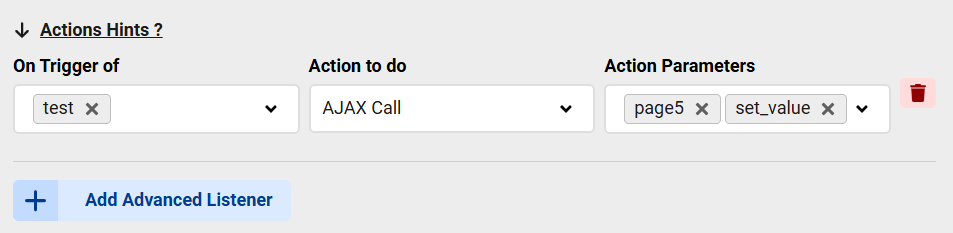
The AJAX will load the result from "page5" and will call a function called "set_value" after the result arrives, this function will get 2 parameters:
- The AJAX result, this will be whatever string or HTML you print in page5
- The field object which has the listener
So you can add a JavaScript view to your form:
function set_value(result, field){
field.value = result
}
And this will set the value of the field to the AJAX result
Hi Max many thanks for your anwer
Just to be sure to have understand propely
javascript with the fuction must be put in the page5 after a php for example that elaborate somethihg as a string
no, javascript should be on the same page where the field called the AJAX, that's the page loaded in your browser

