Hi Max, as in the tiltle.
When using Joins behavior in a read data action, the table names aliases are not transferred to sortable columns and not to Table data path.
As exemple if using field_name1, field_name2, in sortable and or table data paths everything goes well . If then using Main.field_name3 and AliasName.field_name4 then the sortable columns are not read and same for table data path .e.g. table cells remain empty. For the table data path maybe i did not used the right syntax. I tried field_name3 => ok; but Main.field_name3, or {var:row.Main.field_name3} or {var:Main.field_name3} or {row:Main.field_name3} did not work.
Also in debug, on sql syntax ORDER BY ..... only field name without AliasName or Main appears. also missing quotes ` .
Any hint ? In CF7 all field aliases were well interpreted.
Best,

Hi simelas
you need to give aliases to any fields you will use:
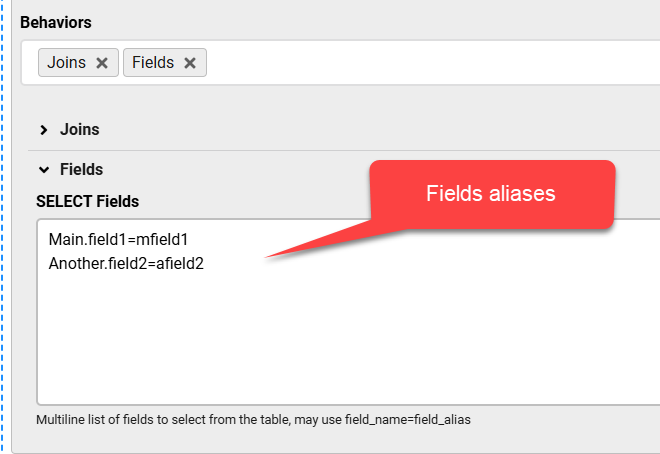
if you do not supply fields then your SQL query will have SELECT *, which means only unique columns names will be included
you can check the generated SQL if you enable the form debug
Hi Max,
Field aliases and debug were used before writing to you.....
I suspect a bug somewhere as the above described issue occurs when using Read type: All matching records with count, and does not occur when using Read type: All matching records.
Best,
Hi simelas
please send me a screenshot of the debug SQL statement in both cases ?
if the SQL has sensitive info then you can send it on the contact page
Hi simelas
I have got the info, as you noted earlier, it was a bug in the count query, this should be fixed in the next update

