I Want to set dropdown List in pageLoad php

Set a dynamic dropdown list in ChronoForms.

Overview

The dropdown options were not loading because the PHP code was placed incorrectly and used the wrong variable assignment.
Place a PHP action above the dropdown field, ensure the code returns the options array, and configure the dropdown to use the PHP action's name.

Answered
ChronoForms v8
fi firstohmICD 22 Nov, 2024
$options = [];$options[] = ['value' => '', 'text' => '請選擇'];

$options[] = ['value' => '1', 'text' => '1'];

$options[] = ['value' => '2', 'text' => '2'];

$this->data['dropdown_Type'] = $options;

This is my PHP code, I Want to set dropdown List in PHP at page Load,But it is not successful and effective.

Max_admin Max_admin 22 Nov, 2024
Answer

you need this code in a PHP action ABOVE the Dropdown field, then you need to configure your dropdown like this:
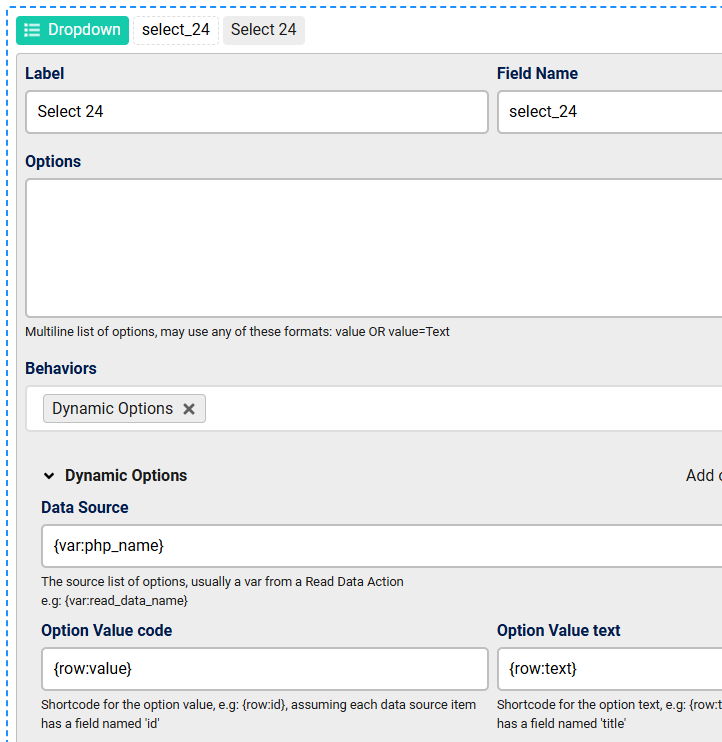
I Want to set dropdown List in pageLoad php image 1

where "php_name" is the name of your PHP action, also your code should be like this:

$options = [];
$options[] = ['value' => '', 'text' => '請選擇'];

$options[] = ['value' => '1', 'text' => '1'];

$options[] = ['value' => '2', 'text' => '2'];

return $options;

tutorial here:

https://www.chronoengine.com/faqs/chronoforms/chronoforms8/dynamic-options-for-dropdowns-and-multi-selection-fields

Max, ChronoForms developer
ChronoMyAdmin: Database administration within Joomla, no phpMyAdmin needed.
ChronoMails simplifies Joomla email: newsletters, logging, and custom templates.
This topic is locked and no more replies can be posted.

