Hello,
Is there a way to pull data from a different source (excel / google sheets) and have those populate the drop down options for a field?
Backstory: My form lists multiple locations in a dropdown list, and those locations change frequently. Since I am going to have multiple forms on the website which will need the same location list, It would be easier to have one location where it is updated instead of changing it in each form. Is something like this possible?
Thank you!

you may use a Google sheet or you may read from a file, any file can work, just write the PHP needed to read the data from the file and convert it to a PHP array which you will set inside a specific variable that can be used as the data source for your dropdowns, the same code can be pasted in every form:
// code to read the file and return a PHP array like this: $array = [["value" => "1", "text" => "first"]];
$this->set("dropdown_values", $array);
after building the code above and adding inside a PHP action, you may use this as the data source for your dropdown:
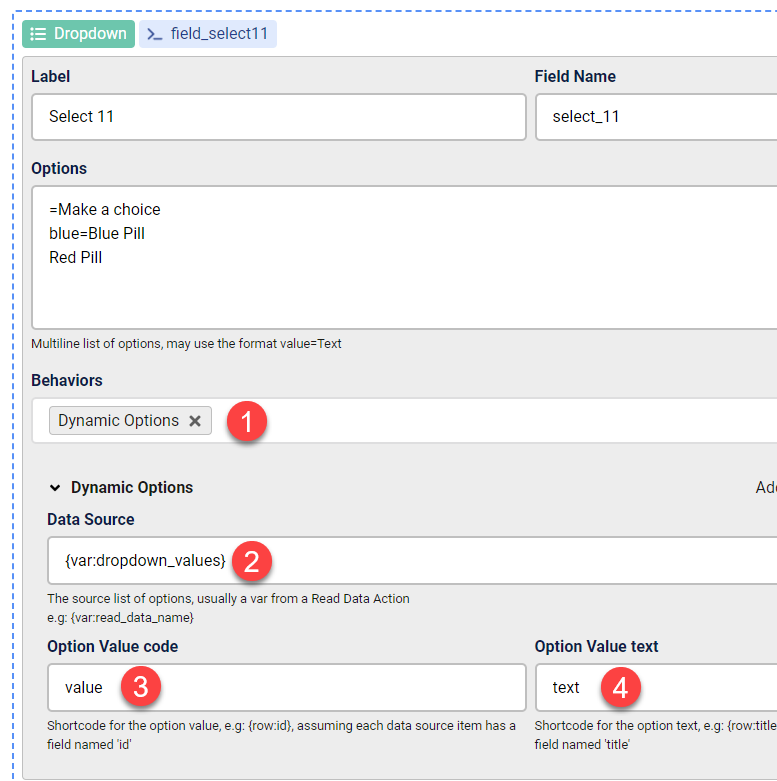
make sure the PHP action is always above the dropdown, you may also place the PHP code in a .php file and just require it in the PHP action

