
I am about to recreate my forms in CF8.
In one of my forms I am validating with Regular expression. It worked last year in CF7, but now it is not working anymore.
It keep saying invalid number, even in CF7.
I have 5 fields for giftcard numbers and I want to validate that the correct number is used.
The number are:
BLDCT-006
BLDCT-007
BLDCT-008
BLDCT-009
BLDCT-010
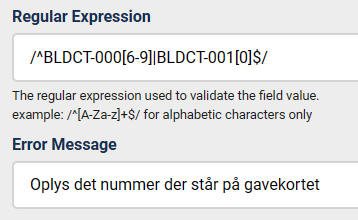
Used Regular expression:
/^BLDCT-000[6-9]|BLDCT-001[0]$/
I got help for this here on forum and hope someone can help me out again to get this working.
The Homepage: https://sup.linedancetoender.dk/index.php/bordertraef-da/bordertraef-tilmelding-2024-da
In one of my forms I am validating with Regular expression. It worked last year in CF7, but now it is not working anymore.
It keep saying invalid number, even in CF7.
I have 5 fields for giftcard numbers and I want to validate that the correct number is used.
The number are:
BLDCT-006
BLDCT-007
BLDCT-008
BLDCT-009
BLDCT-010
Used Regular expression:
/^BLDCT-000[6-9]|BLDCT-001[0]$/
I got help for this here on forum and hope someone can help me out again to get this working.
The Homepage: https://sup.linedancetoender.dk/index.php/bordertraef-da/bordertraef-tilmelding-2024-da

your regex is wrong because it has extra 0
/^BLDCT-000[6-9]|BLDCT-001[0]$/
/^BLDCT-000[6-9]|BLDCT-001[0]$/
Oh. Thank you very much.
Got it. Also there was an extra 0 before [6-9]
/^BLDCT-00[6-9]|BLDCT-01[0]$/
and it is working now.
Got it. Also there was an extra 0 before [6-9]
/^BLDCT-00[6-9]|BLDCT-01[0]$/
and it is working now.
This topic is locked and no more replies can be posted.

