hi
i have this db: avj3_chronoforms8_accrediti_team
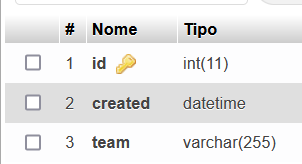
in CF8 I want to read field "TEAM" and I want to put it like choice of my radiobutton:
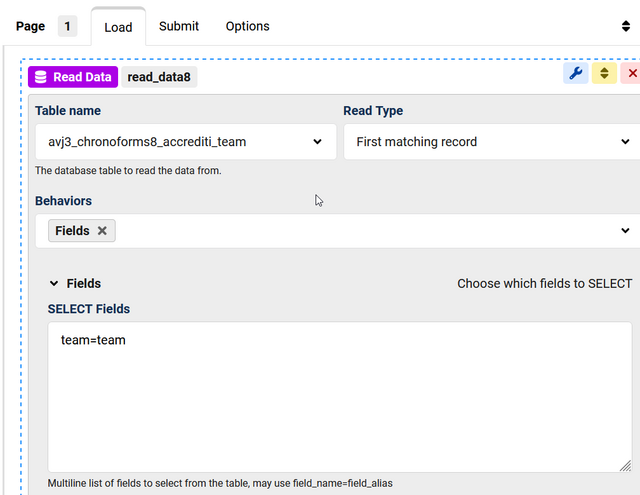
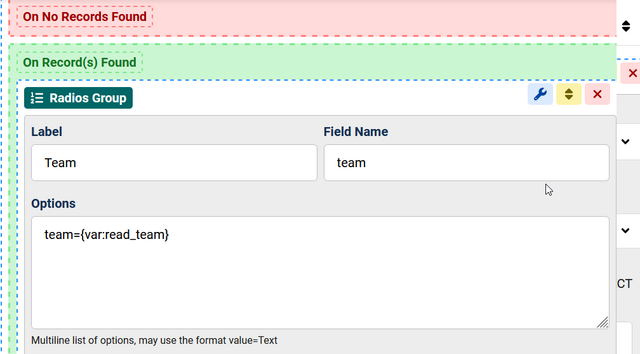
but with this code i don't stamp the field "TEAM" in my db 😟
i have this db: avj3_chronoforms8_accrediti_team
in CF8 I want to read field "TEAM" and I want to put it like choice of my radiobutton:
but with this code i don't stamp the field "TEAM" in my db 😟
Behavios -> Dynamic Options
Data Source: {var:read_data8} (or change name from read_data8 to read_team: DB Read data -> Wizard Settings -> Name: read_team)
Option Value code: {row:id}
Option Value text: {row:team}
Data Source: {var:read_data8} (or change name from read_data8 to read_team: DB Read data -> Wizard Settings -> Name: read_team)
Option Value code: {row:id}
Option Value text: {row:team}
Hi, thanks for your reply but it doesn't work.
I show my settings:

with these settings I haven't a label on radiobutton.
I show my settings:
with these settings I haven't a label on radiobutton.
try that
db_read -> wizard settings-> name: read_team
db_read -> Read Type: All matching records
db_read -> Behavios: Data Merge
radios group -> options: empty or =--Please Select--
radios group -> dynamic options -> Data Source: {var:read_team}
radois group -> dynamic options -> Option Value Code: {row:id}
radois group -> dynamic options -> Option Value Text: {row:team}
db_read -> wizard settings-> name: read_team
db_read -> Read Type: All matching records
db_read -> Behavios: Data Merge
radios group -> options: empty or =--Please Select--
radios group -> dynamic options -> Data Source: {var:read_team}
radois group -> dynamic options -> Option Value Code: {row:id}
radois group -> dynamic options -> Option Value Text: {row:team}
PERFECT !!!!
it work with:
radios group -> options: empty
thank you !!!
it work with:
radios group -> options: empty
thank you !!!
This topic is locked and no more replies can be posted.

