After install ChronoMyAdmin have i a Problem with my WS_Concat in a form Unknown Column concat_ws (",Gattung, ...) in select. And i can Form Not Open. And after the Deinstall the Problem Not going. Wat can i do?
Problem solved. I must CF 8 install new.
The Message wars that SQL new updated.

ChronoForms 8 has the latest library update, other Chrono extensions may not have this.
But the Problem ist: You have an error in your SQL syntax; check the manual that corresponds to your MariaDB server version for the right syntax to use near '`bundesland`='BB'' at line 1
and i have the Message in Green: row deleted.
But row ist Not deleted...
But installing the latest ChronoForms8 solved the issue or not ?
Okay, the first Problem ist solved. This Message ist new in Backend from the Extension.
I will need the full SQL query then, is this a Delete Data action inside a form ?
Hi Max,
I select my table directly in ChronoAdmin, open it, and look for the row I want to delete. There are "Edit" and "Delete" buttons at the beginning of the row. I click "Delete." I get a notification, but the record isn't actually deleted. However, if I use phpMyAdmin via my hosting provider, I can delete the row without any issues.
F.
Hi Fredolino
I did not understand from the question that is for ChronoMyAdmin, I will check that and update you
Hi Max,
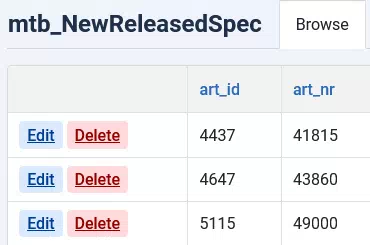
What I mean is that the delete button (see screenshot) didn't work. I get a message stating that the record has been deleted, but it hasn't actually been deleted.If I delete the record directly in the database via phpMyAdmin instead of using ChronoMyAdmin, it works without any issues.
F.
Hi Fredolino
Your table has primary key as one column or more than 1 ?


