Hi,
In a former CF 7 form, I used the following PHP to get data from JEvents. In the front end, the user could check all dates and they were correctly sent by mail.
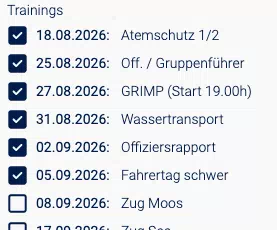
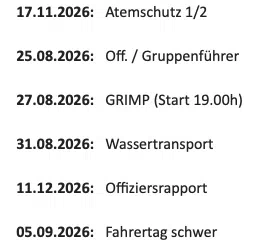
After having migrated to CF 8, I have a strange problem: In the front end, the dates are displayed correctly. But in the mail, it displays always the last of same named events instead of the one that is chosen.
How comes?
The option text path is: <table><tr><td style="width:85px"><strong>{row:dtstart_formatted}:</strong> </td><td>{row:summary}</td></tr></table>
Strange enough: When I do not format the UNIX date, then frontend as well as mail show the exact same UNIX value. But... of course, I cannot display that...
The PHP is as follows, and the mail just contains {email:data_table}
$current_day = JFactory::getDate('+0 seconds');
$current_day = $current_day->toUnix();
$db =& JFactory::getDBO();
$query = "SELECT
#__jevents_vevdetail.dtstart,
#__jevents_vevdetail.summary,
#__jevents_vevdetail.extra_info
FROM #__jevents_vevdetail
INNER JOIN #__jevents_vevent ON #__jevents_vevdetail.evdet_id = #__jevents_vevent.detail_id
WHERE #__jevents_vevdetail.dtstart > " . $current_day ." AND
#__jevents_vevent.access = 1 AND
#__jevents_vevent.state >= 1order by #__jevents_vevdetail.dtstart;
";
$db->setQuery($query);
$rows = $db->loadAssocList();
foreach ($rows as &$r) {
$r['dtstart_formatted'] = date('d.m.Y', $r['dtstart']);
}
return $rows;
Please note: I am not a programmer. The above code was constructed with the help of this forum, years ago.
Thanks so much for your help!
Martin

Hi Martin
When you use "dtstart" instead of "dtstart_formatted", are you getting the same list of items with the same date values or are they still wrong ?
Dear Max,
first of all: thank you for taking care of this issue!
When you use "dtstart" instead of "dtstart_formatted", are you getting the same list of items with the same date values or are they still wrong ?
This only serves to convert UNIX timestamps into readable dates. When I use the regular dtstart, then we get this:
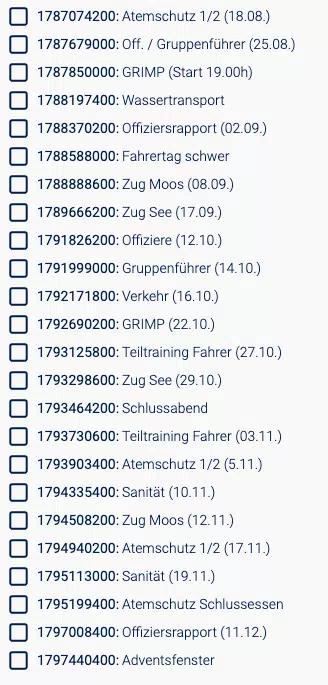
Please note three points:
- The very form in CF 7 used to work flawlessly for years 😃
- In CF 8, when not using the conversion, then we get the same UNIX value in the frontend - AND in the mail!
- When using the conversion, we get the right order and date in the frontend, but ... it always sends the last of same named events.
So what I recommended my customer (who does not really feel happy about this) to make every event name unique (as you see on the screenshot). Then it works! Originally, these firefighters have lots of trainings, but lots of them have the same name. Just a different date of course.
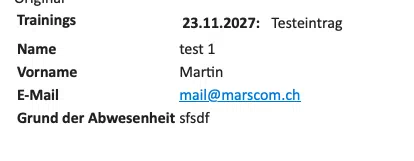
To show what happens, I created three same named events (Testevent) with different dates. They are displayed correctly in the front end:
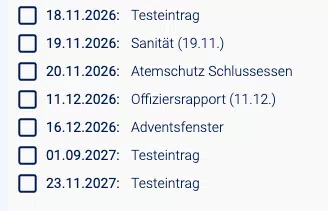
When I choose the first one, I get this in the mail:
When I choose the second one, I get this:
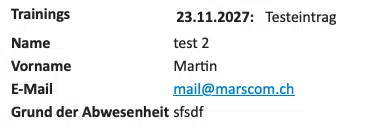
Both show the date of the last of these three same named events.
What the heck could this be? I tested and fumbled for more than four hours. Just to find this workaround.
If you need access to the backend, please let me know.
Best regards
Martin
Hi Martin
Ok, I was only trying to understand what is the problem exactly.
if the problem is that you get a specific record for records with the same name, then most probably the checkbox value you pass when selecting the record is not correct, it can be the record's name (which is not unique) or maybe the date, please make sure your checkbox value is the record's ID and that the ID should be unique, but the SQL statement does not return the record ID, you need to adjust that here:
SELECT

#__jevents_vevdetail.dtstart,

#__jevents_vevdetail.summary,

#__jevents_vevdetail.extra_info

FROM #__jevents_vevdetail
Then you can select the correct record to display using the ID, I do not know how you do that, you did not mentioned it.
Here is also a tutorial on the subject:
Dear Max,
seems like I found it out, with a little help of Claude (but just to give me new ideas, not a working guide ...):

The Option Value Path should only contain the event ID, nothing more, nothing less.
So: after hours of fumbling, testing, skipping meals, the issue is solved.
Thank you so much for caring about this issue!
Best regards
Martin
Hi Martin
No problem, you are welcome.

