Hi Max,
Only just had time to test importing Chronoforms7 Connectivity form into Chronoforms8. Unfortunately as simple forms and connectivity forms are very different, it doesn't transfer very well and need a lot of work.
I noticed all the views and functions are imported into a page called "-connectivity-repo-page-". While the function can be called using {fn:function}, there is no way to call the views (it cannot be given a name like functions)?

Hi webbusteruk
Do you need to call views from different pages ? can you give me a scenario ?
I think it's usually better to have each page's views under that page, v7 saved all actions/vies under a single page and so v8 restores the same page, but it will be more organized if you drag the actions/views from that page under each page you have in v8
Let me know if you think the old way is better
I think one simple example will be css and javascript {views} that need to be repeated across different pages.
There can be other views that might be repeated on multiple pages, eg html snippets.
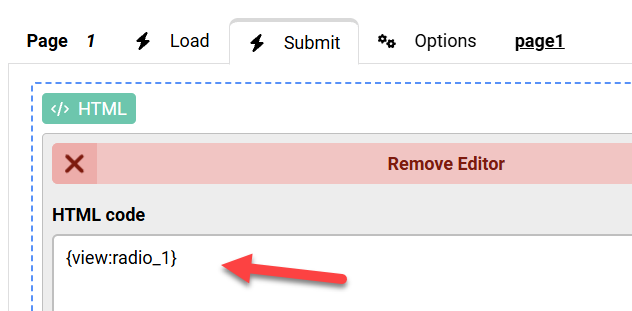
You can always do that using the Wizard Settings behavior in a View, set the name there and you can then call the view from any page using that name.
The next update should show a view name if it has been set using a Wizard Settings behavior
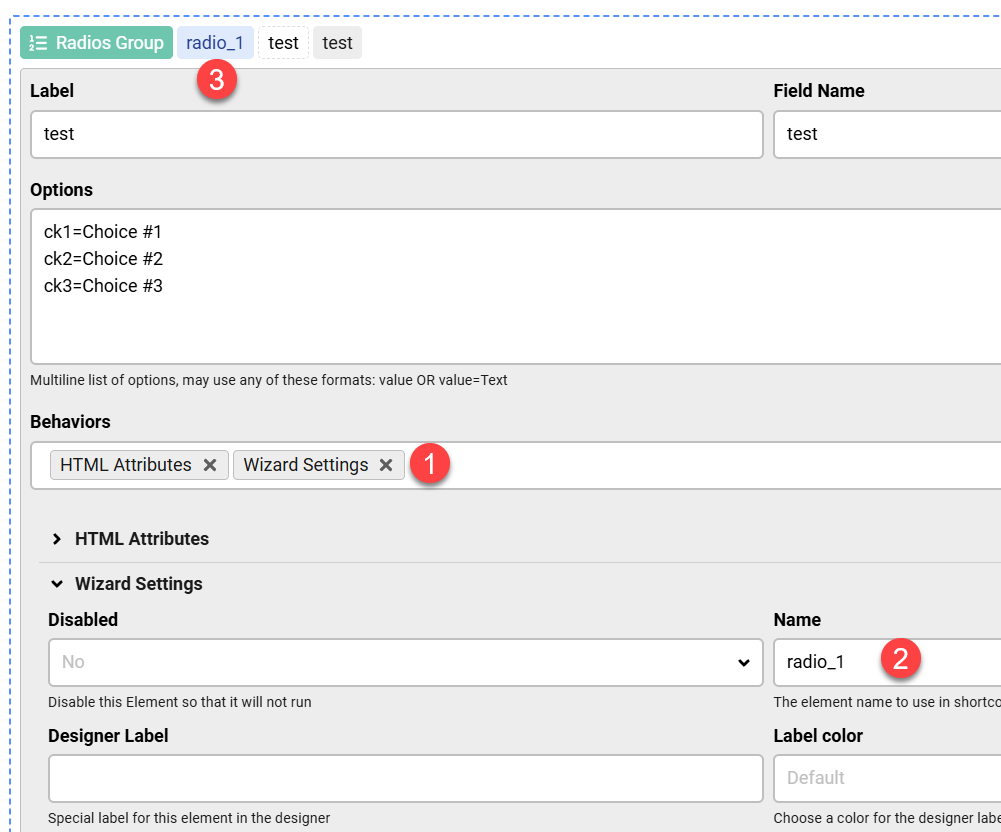
Calling the view: