CF8
Joomla 5.4.1
PHP 8.3.28
MacOs 15.7.2
After updating CF7 to CF8 I'm not able to sent my form on the live-site. It works when using Admin Preview mode, all mail is sent.Also simple demo forms will not sent from live-site.
I'm using a dropdown menu which is not showing items on Firefox and Safari. On Chrome the items are visible and selectable.
Best regards, Ben

Hello Ben
Please share a screenshot of the dropdown menu or a link to the form
For emails, are you testing the form using the "Front" link in the forms manager ? please test using that link, does the email work ?
Hi Max,
Thanks for your reply.
A screenshot of the dropdown menu is attached as well as a backup of the form.
Testing the form using the "Front" link is not possible. Result: #0 Unknown named parameter $title
If testing using the "Admin" link it's working as it should be.
Best regards, Ben
Did you install any other Chrono extensions after ChronoForms8 ? if yes then please install ChronoForms8 again over what you have because it has the latest shared library files which may be causing the "Result: #0 Unknown named parameter $title" error.
Regarding the dropdown, it looks like you have used email addresses in the Dropdown options, and the Email Protection Joomla plugin has blocked them, this is why the dropdown is not working on Firefox, here is the safe way to get an email address based on a selection:
Let me know if this fixes the issues you have.
Hello Max,
The dropdown works now, thanks for the information.
I still can't test the form via the front-end link. Nor in other browsers.
I uninstalled everything from Chronoforms and reinstalled it. CF8 and the plugin too. On the live site, I can fill out everything, but not submit it. If testing the form via the admin-link it works well.
Hi Endeben
Can you post a screenshot of what happens when you try to test the form on frontend ?
Hi Max,
When testing in Preview mode "Front" the result is attached.
When testing on the live site the form is emptied and ready for next entry.
Hi Endeben
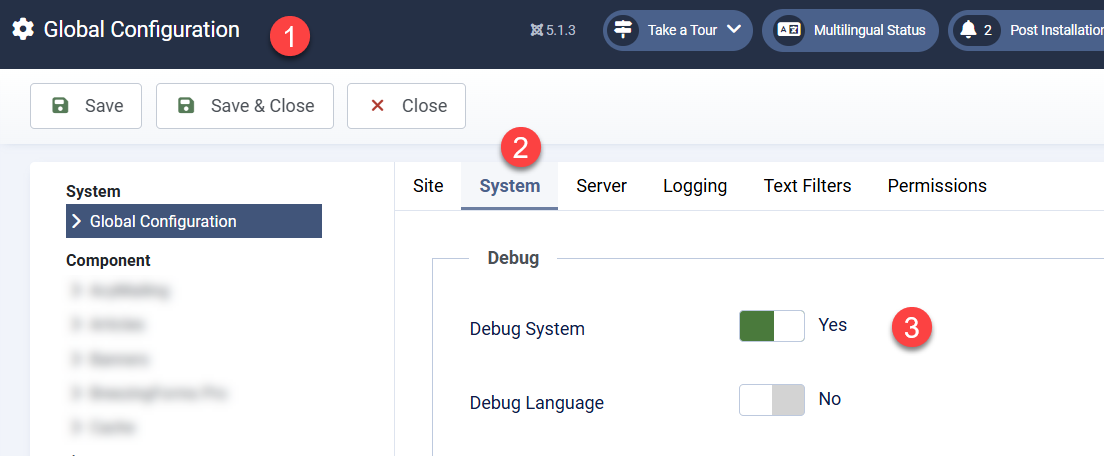
Please go to the Joomla global config and turn on the Debug, then do the Front test again, and send me the errors displayed.
Hi Max, check attachment
I'm considering installing CF7 and see if that works
Hi Endeben
This is a wrong image and it's too small to read :)
After you enable the debug in Joomla configuration please test the form on Front and send me the debug report, it will be a list of lines about the error encountered.
Hi Max,
There was no other information. When using Debug on CF8: see attached file
Hi Endeben
I do not need the ChronoForms debug, I need the Joomla Debug, please check the image:
Hi Max,
Debug on Joomla gives no errors.
I've installed CF7 and that is working fantastic as it was. So sticking to CF7 for the time.
Thanks very much for your support,
Ben
Hi Endeben
if you are getting the error you showed me earlier then the Debug should show the source of the error on the same page after you have turned it on.
v7 is ok but it does not get new development or features.

