Hi max,
I have in a html field with this line:
<hr><p><strong>Het vakgebied is alleen aan te passen via de app:</strong> <a href="https://www.atelier78.nl/docent-vakgebied-1-1?terug=docenten">docent-vakgebied</a>.</p>to start an other CF form called: docent-vakgebied-1-1 with param "terug=docenten".
When I use this link It is changed in : https://www.atelier78.nl/docent-vakgebied-1-1?terug=docenten&chronopage=ophalen+vakgebieden
Why there is "&chronopage=ophalen+vakgebieden" coming from??
Greetings
Paul

Hi Paul
Can you post a screenshot of your HTML code content ? when I use your code here I get the correct link.
Hi Max,
This is the HTML:
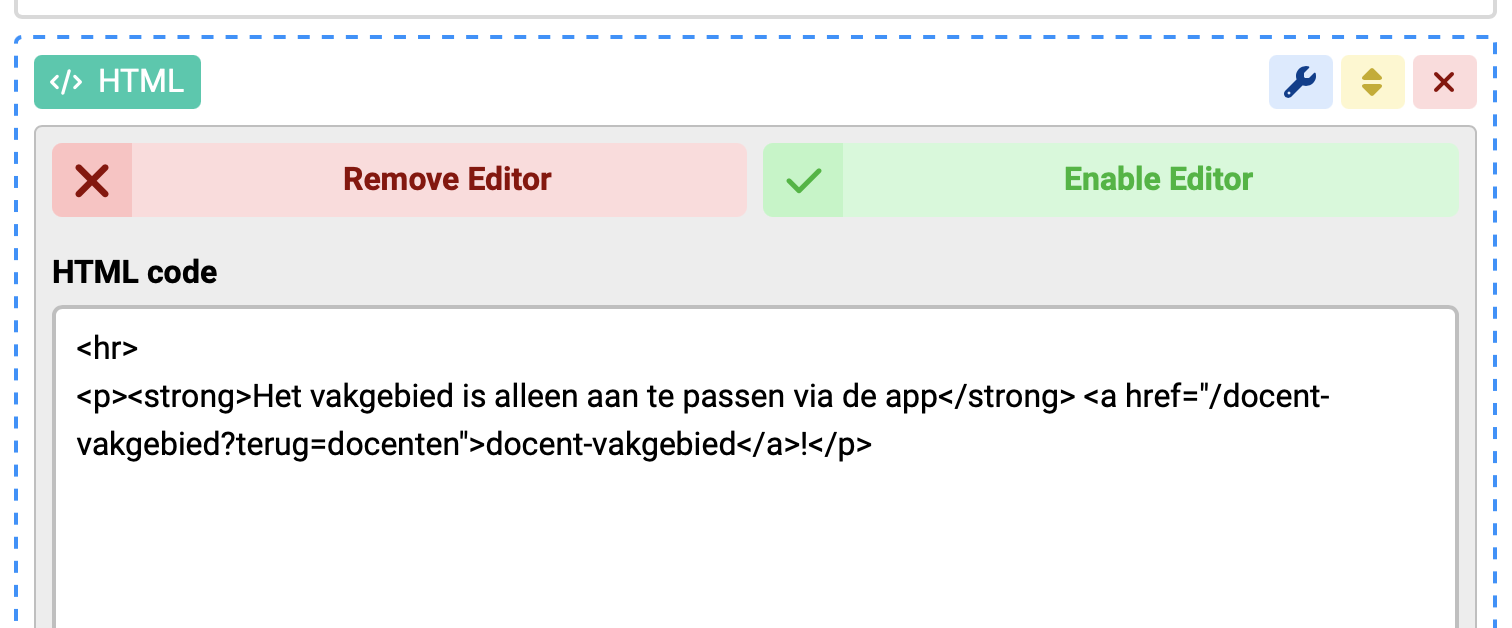
The result is this in de browser:
https://www.atelier78.nl/docent-vakgebied?terug=docenten&chronopage=ophalen+vakgebieden
I hope you cab explain and how what is the solution to call a form in an other form with some parameters.
Greetings
Paul
Hi Max,
I look for an other solution. I have stopped with this solution and let it as it was. Two separated forms and no integration.
Thanks for so far,
Greetings
Paul
Hi Paul
That's ok, no problem.

