Event trigger with fields value comparison

Trigger a ChronoForms event by comparing a field value to a dynamic data variable.

Overview

The trigger was not working because a shortcode referencing a data variable was not being interpreted, due to a typo in the code.
Ensure the data variable is correctly set and appears in the debug data. Use the "Value IN" trigger condition and verify there are no typos in the shortcode or related code.

Answered
ChronoForms v8
si simelas 24 Oct, 2025

Hi Max, in CFV7 it was possible to trigger an event by comparing a field value with a variable. Exemple in attached pict.

How would you do that with CF8 ?
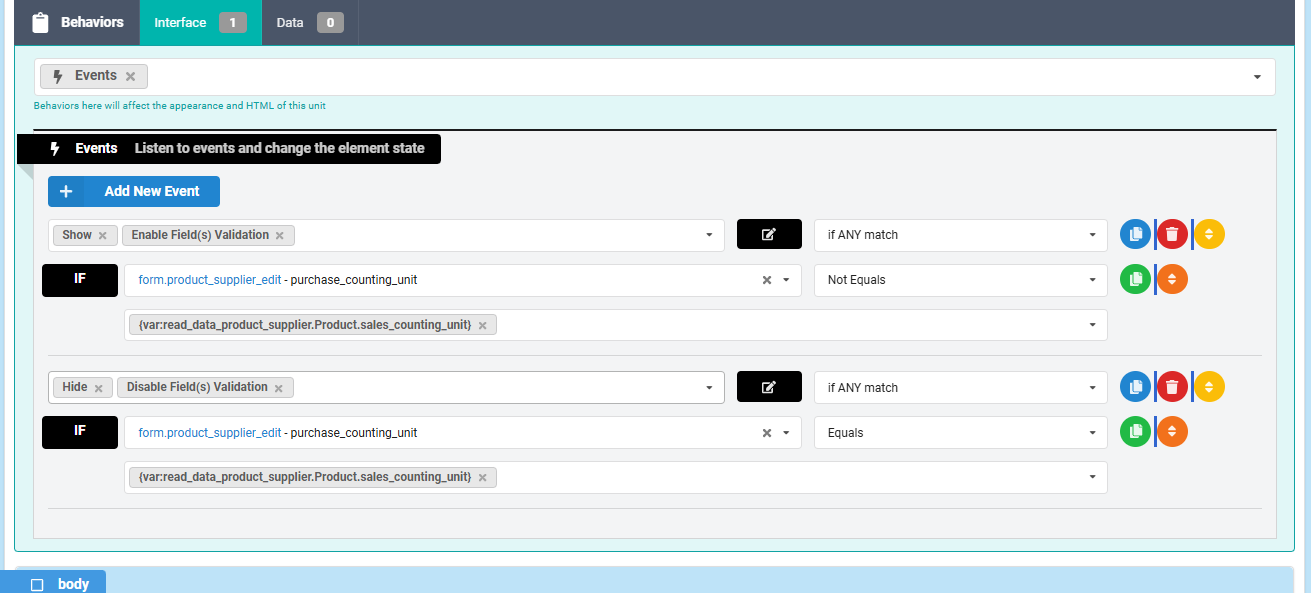
Event trigger with fields value comparison image 1

Cheers,

s

Max_admin Max_admin 25 Oct, 2025
Answer

Hi simelas

The "Value IN" "On" in the trigger will do just that, and you can use shortcodes in the Values:

Event trigger with fields value comparison image 2

Max, ChronoForms developer
ChronoMyAdmin: Database administration within Joomla, no phpMyAdmin needed.
ChronoMails simplifies Joomla email: newsletters, logging, and custom templates.
si simelas 25 Oct, 2025

Hi Max,

That is exactly what i had done, but it seems that the short code is not interpreted {data:test}. When puttin a value "3" it works. 

However when using {var:my_variable} it works.

Could you have a look ?

(The trigger is in a dropdown).

Cheers,

Max_admin Max_admin 26 Oct, 2025

Hi simelas

All shortcodes should work, but in this case do you have a data variable already set ? if it's set then it should appear in the debug Data variables, if it's not there then it will be empty

if this is your first form page then the only data variables available are those set in the form URL like: &test=123

Max, ChronoForms developer
ChronoMyAdmin: Database administration within Joomla, no phpMyAdmin needed.
ChronoMails simplifies Joomla email: newsletters, logging, and custom templates.
si simelas 26 Oct, 2025
1 Likes

Hi Max,

to answer to your inputs:

"do you have a data variable already set ?"  => yes 

" if it's set then it should appear in the debug Data variables"  => it appears

This is why i was puzzled !

Finally found the reason : My mistake => there was a typo in some code lines ....

Cheers!

S

Post a Reply

