Hi Max,
I have a Ckeckbox group and I want to have the possibility to "select all". How can I do that?
Can you help me?
Greetings
Paul

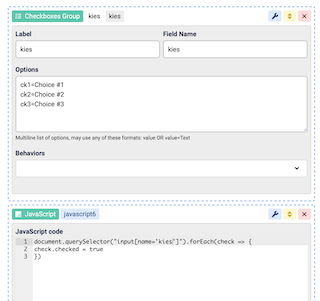
You need to use some javascript code in a JavaScript view:
document.querySelector("input[name='checkoboxes-name']").forEach(check => {
check.checked = true
})
this code should run when your select all checkbox or button is clicked
Hi Max,
I have this simple form with your javascript, but nothing changed. What is the problem and what do I wrong?
Paul
the code should be inside an event listener:
document.querySelector("#id").addEventListener("click", e => {
    document.querySelector("input[name='checkoboxes-name']").forEach(check => {
        check.checked = true
    })
})
where #id is the id of the field to be clicked, you need to change this based on your requirements
Hi max,
I have tried all kind of triggers etc..
Can you please send me a working example how to use javascript te change the checkboxes.
Paul
I tested the following code and is working:
document.addEventListener("DOMContentLoaded", function (event) {
    document.querySelector("[name='checkbox_2']").addEventListener("change", e => { // checkbox_2 is the name of the master checkbox
        document.querySelectorAll("input[name='checkboxes_3[]']").forEach(check => { // checkboxes_3[] is the name of the other checkboxes
            Nui.Checkbox.getInstance(check.closest(".nui.checkbox")).toggle()
        })
    })
})
I have also added "Select All" to the list of Listener actions which can be fired on triggers
Hi Max,
last year you gave me this solution for a Select all problem. But after installing version V8.0.49 it doesn't work anymore.
I work with the latest version and there is a listener action but I doen't know how to trigger this one and there isn't a solution for de-select.
In version 49 it stil works with the Javascript you gave me.
So is there a solution for this?
Greetings,
Paul
Hi Paul
In the latest update there Table view has a Selector behavior where you can set the column name to have a selector checkbox, that will add a Select All checkbox automatically to the header
Hello Max,
I'll use the table view, but why doesn't the previous solution work anymore? In version 8.0.49, this wasn't a problem, and the JavaScript solution worked without issue.
Greetings,
Paul
Hi Paul
I'm not sure, please open your browser console, do you have any errors before or after clicking the checkbox ?
Hi Max,
This is the output in console:
}</style><script type="text/javascript">document.addEventListener("DOMContentLoaded", function (event) { document.querySelector("[name='selecteer_alle_leden']").addEventListener("change", e => { // checkbox_2 is the name of the master checkbox document.querySelectorAll("input[name='leden[]']").forEach(check => { // checkboxes_3[] is the name of the other checkboxes Nui.Checkbox.getInstance(check.closest(".nui.checkbox")).toggle() }) })})</script>
Paul
Could you please post a screenshot ?
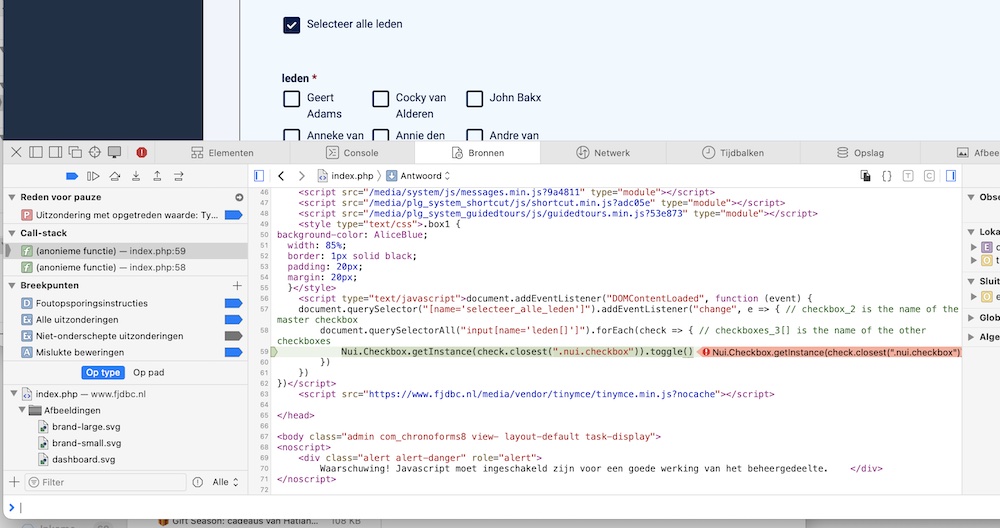
Hi Paul
The error will be under the Console tab in your last image, apologies for the late reply

